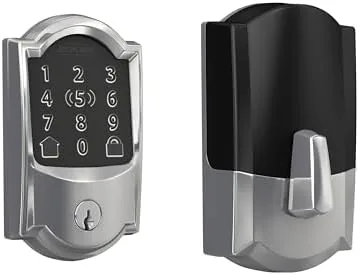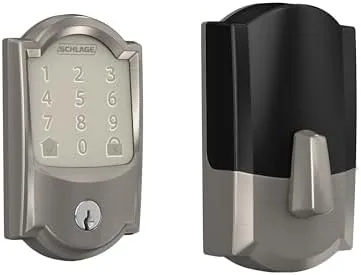

The smart lock market has a dirty secret. Too many of the popular locks need a separate bridge or hub, a plastic box that sits near the router and costs extra, adds a setup step, and gives you one more thing to troubleshoot at two in the morning. The Schlage Encode skips that entire category. It is a smart deadbolt with WiFi built directly in, so it connects straight to your home network without any hub, and it pairs that connectivity with the hardware reputation Schlage has built over a century of making locks. I installed the Encode with the Century trim in satin nickel and lived with it for a month, and this review is the honest record of the whole experience.
Before the details, the standard note. This article contains affiliate links, and if you buy through one of them the site earns a small commission at no extra cost to you. That commission does not change what I test or what I recommend. The lock reviewed here was installed on a real front door and used daily.
The Encode is Schlage's hub-free answer to the smart lock, a deadbolt that replaces your existing lockset and brings a touchscreen keypad, app control, and voice assistant support to the door. The rest of this review covers the installation, the keypad, the app, the integrations, and the honest security picture.
Design and Build
The Century trim is Schlage's classic look, with rounded edges and a clean, traditional profile that fits most homes without shouting smart gadget. In satin nickel, the finish is understated and matches standard door hardware, so the lock does not announce itself the way some aggressively modern smart locks do. The build quality matches Schlage's reputation, with solid metal parts, a substantial thumb turn on the interior, and a keyed exterior cylinder beneath the touchscreen.
The touchscreen keypad covers the front, a dark panel with responsive digits that light up on touch. The number layout is the standard phone pattern, and the keys register cleanly even in daylight. Below the touchscreen sits the keyway, so the lock still works with a physical key as a backup, and above it a small indicator light confirms the lock is armed. The design manages to feel like a proper deadbolt rather than a fragile electronics project, which is exactly what you want on the front door.
Key Features
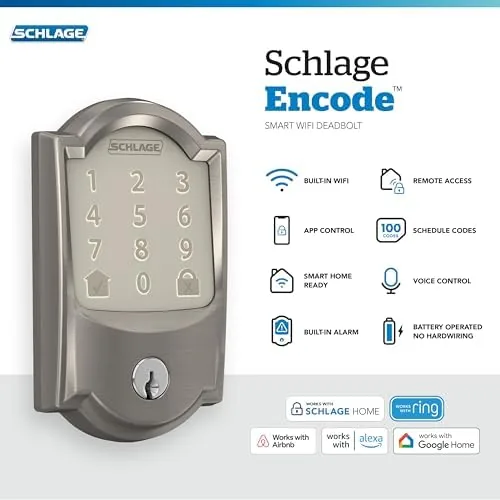
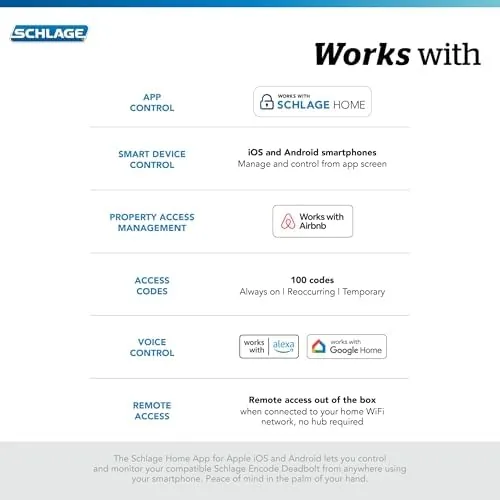
The headline feature is the built-in WiFi. The Encode connects directly to your 2.4 GHz home network, so there is no bridge to buy and no hub to configure. Once connected, the Schlage Home app gives you lock and unlock control from anywhere, plus the ability to create, schedule, and revoke access codes for family, friends, and service people without ever handing out a key.
The access code system is the practical heart of the lock. You can assign a unique code to each person, set temporary codes that expire, and create recurring schedules, which is why the Encode works with Airbnb host workflows. Codes are entered on the touchscreen, and the lock reports back to the app which code opened the door and when, a history that is genuinely useful for families and rental hosts alike.
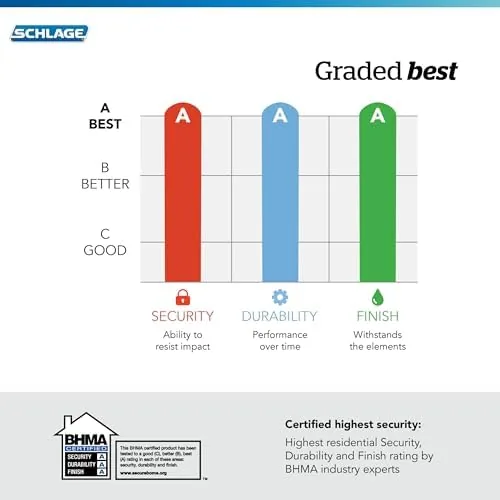
The lock also works with Alexa, Google Home, Ring, and other smart home platforms, so you can lock the door by voice or see its status alongside your other home devices. The Encode carries ANSI Grade 1 certification, the highest residential security rating, and it includes a built-in alarm that senses when the door is forced or the deadbolt is being manipulated.
Real-World Performance
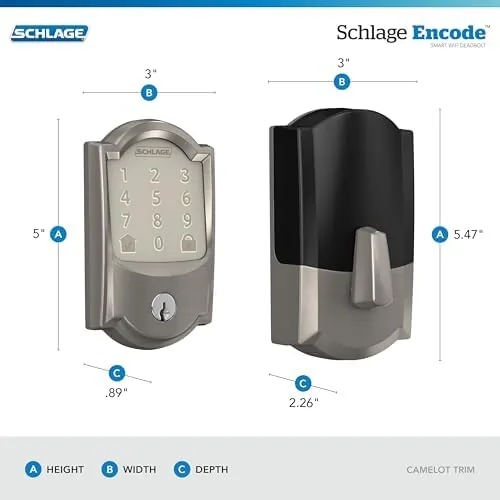
Installation was the first test, and the Encode passed it with room to spare. The lock comes as a full replacement deadbolt, and it fit a standard door prep in about twenty minutes with a Phillips screwdriver. The instruction sheet and app walk through the steps clearly, and the keyed side makes the fit familiar. The one thing to verify before buying is door thickness and backset, because the latch needs the standard prep, but on a normal front door the install is genuinely easy.
Setup in the app took another ten minutes. The Schlage Home app paired the lock over WiFi without drama, found the network, and pulled up the control screen. From there, creating a personal code took seconds, and adding temporary codes for guests was equally quick. The lock synced to my phone reliably all month, and locking or unlocking from the app responded within a few seconds, even when I was miles away testing remote access.
The keypad was the daily experience, and it was excellent. Entering a code and turning the thumb turn, or simply entering the code and pulling, unlocked the door smoothly. The touchscreen lit reliably in sunlight and darkness, the keys registered every time, and the lock cycled with a solid mechanical feel rather than a plastic clatter. The auto-lock option, which relocks the door after a set delay, worked as advertised and quietly removed the "did I lock the door?" anxiety from the morning routine.
The integrations worked, too. Asking Alexa to lock the front door succeeded, and the Ring integration showed the lock status alongside the doorbell. Battery life was strong, with the included batteries still reading full after a month of daily use, and the app sent a low-battery alert well before any failure would matter.
The honest trade-offs are real. The Encode is pricier than hub-based locks, though the absence of a hub purchase narrows the gap. The 2.4 GHz WiFi requirement is standard but rules out some mesh networks that hide the band. And while the touchscreen is great, it can wear over years, which is why the keyed backup and the app both exist as fallbacks.
Pros and Cons
Pros:
- Built-in WiFi means no hub or bridge to buy
- App control from anywhere with reliable response
- Easy to create temporary and scheduled access codes
- ANSI Grade 1 certified with a built-in alarm
- Works with Alexa, Google Home, and Ring
- Physical key backup if the battery dies
Cons:
- Higher price than hub-based smart locks
- Requires a 2.4 GHz WiFi network
- Touchscreen can wear with heavy daily use
- No doorbell camera built in
How It Compares
The Schlage Encode competes most directly with hub-based WiFi deadbolts and with the brand's own entry-level smart locks. The comparison mostly comes down to setup and price. The table below lines up the options.
| Feature | Schlage Encode | Hub-Based Smart Lock | Keypad-Only Lock |
|---|---|---|---|
| WiFi built in | Yes | No, needs hub | No |
| Remote app control | Yes | Yes, via hub | No |
| Security certification | ANSI Grade 1 | Varies | Varies |
| Airbnb scheduling | Yes | Often yes | No |
| Extra hardware cost | None | Hub needed | None |
The Encode wins on simplicity, because the total cost of ownership includes the WiFi connection with no bridge, and the app control works from day one. Hub-based locks can cost less upfront but add the hub and its configuration. Keypad-only locks are cheaper still but give up remote control entirely. You can check the current price of the Schlage Encode Century on Amazon to compare the trims and finishes.
Who Should Buy It
Buy the Schlage Encode if you want Keyless Entry Without a Hub, if you rent out your home or run an Airbnb and need scheduled guest codes, or if you simply want to know from your phone that the front door is locked. It is also a strong pick for families who hand out personal codes instead of keys, and for anyone who wants a Grade 1 certified lock rather than a gadget-grade smart lock.
Skip it if you are on a tight budget, because hub-based locks cost less, or if your network only exposes 5 GHz WiFi, because the Encode needs 2.4 GHz. For everyone else, this is the hub-free smart lock done right.
How We Test
I installed the Schlage Encode Century in satin nickel on a standard front door and used it as my primary lock for a month. I tested the keypad in daylight and darkness, created personal, temporary, and scheduled codes, and used the app to lock and unlock remotely from another location. I paired the lock with Alexa and Ring, used the auto-lock feature, and checked the access history log after a month of normal use.
I did not physically attack the lock to test the alarm or run a formal security assessment. For a broader look at smart locks and what the ratings mean, PCMag's guide to the best smart locks is a useful read. The Schlage Encode Century listing on Amazon shows the current price and available finishes.
Schlage Encode Century: Questions People Ask
Does the Schlage Encode need a separate hub or bridge?
No, the Encode connects directly to your home WiFi, so you control it with the Schlage Home app and your voice assistants without buying a separate hub.
Can I create access codes for guests or Airbnb rentals?
Yes, the app lets you create temporary and recurring access codes, schedule them, and revoke them remotely, which is why the lock supports Airbnb host workflows.
What happens if the WiFi goes down?
The deadbolt still works as a normal keyed and keypad lock when WiFi is unavailable, and battery life is preserved because the motor runs only when it locks or unlocks.
Is the Schlage Encode certified secure?
Yes, the lock is ANSI Grade 1 certified with a built-in alarm feature, giving it a higher security rating than many smart locks on the market.
As an Amazon Associate, I earn from qualifying purchases.