
Wireless gaming headsets usually trade one headache for another. The comfortable ones are heavy, the light ones feel cheap, and the ones that sound great often refuse to move between a PC and a Nintendo Switch without a drawer full of dongles. The Razer Barracuda X attacks that problem from an unusual angle. It weighs just 250 grams, which makes it one of the lightest wireless headsets you can buy, and it relies on a single USB-C dongle that hops between Platforms almost without ceremony. After two weeks of bouncing it between my PC, my Switch, and a phone, I have a clear picture of what it does well and where it stays quiet.
Before the details, the standard note. This article contains affiliate links, and if you buy through one of them the site earns a small commission at no extra cost to you. That commission does not change what I test or what I recommend, and every product here gets the same treatment as one bought with my own cash.
Design and Build
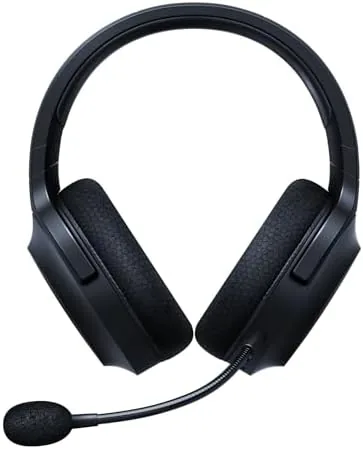
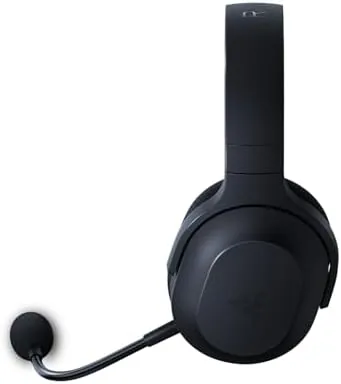
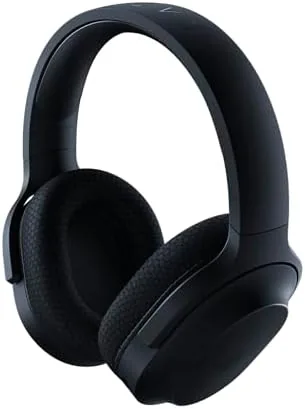
The Barracuda X is defined by its weight. At 250 grams it is light enough that you forget it is on your head, and that is the highest praise a gaming headset can earn. The frame is plastic but feels dense and sturdy, with a padded fabric headband and memory foam ear cushions that grip gently rather than squeezing. The ear cups rotate flat, which makes the headset lay neatly around a neck or pack into a bag for travel.
The controls are minimal and logical. The volume wheel sits on the left cup, the mute button and power sit beside it, and the USB-C charging port tucks into the back edge. The detachable boom mic pulls out with a firm click, and when it is removed the headset works cleanly as a music and mobile headset. There is no RGB lighting anywhere on the unit, which is a deliberate choice, and one that keeps the battery focused on audio rather than spectacle.
Key Features
The defining feature is the USB-C wireless dongle. Plug it into a PC, a Nintendo Switch, or a compatible console and the headset connects with no pairing menu and no software required. That simplicity is the whole point of the design, and it works exactly as advertised. The same dongle also makes the headset cross-platform, so you can move from a desktop to a handheld in the time it takes to move one small stick.
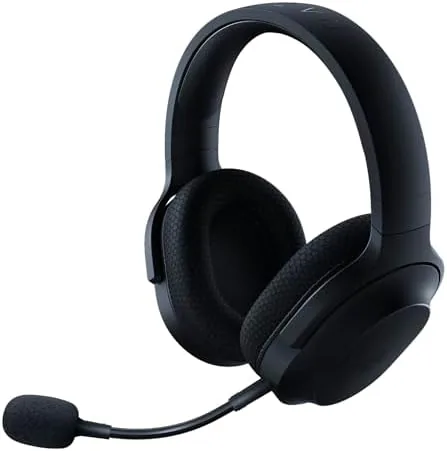
Inside are 40mm drivers that deliver a well balanced sound signature, which is a breath of fresh air in a category that often over hypes bass. The headset also connects over Bluetooth to a phone, so you can take calls or listen to music without touching the dongle. Battery life is rated at about 20 hours of wireless use per charge, and the USB-C port tops it up quickly when you are between sessions.
Real-World Performance
I ran the Barracuda X across my usual week of gaming, office calls, and music. On the PC the dongle connected instantly, and games sounded clear and detailed. Footsteps in a shooter were easy to place, and the sound never felt harsh at longer sessions. On the Switch, the same dongle worked with the console in handheld mode, which is the kind of small convenience that makes a multi-platform headset worth owning.
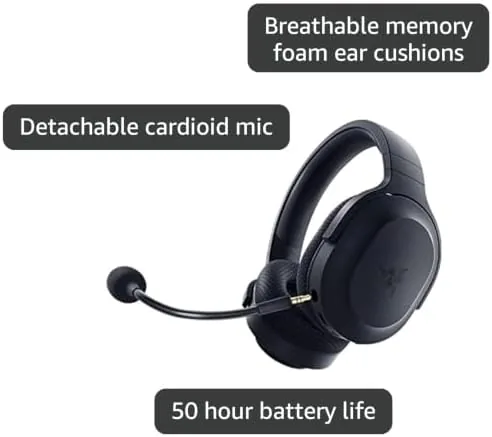
Comfort held up through a three hour session without the usual hot spots, thanks to the light weight and breathable cushions, and the memory foam did not harden or flatten over the two weeks of testing. The microphone is serviceable but not remarkable: it handles Discord calls and team chat clearly enough, though it picks up a bit of room noise and lacks the richer voice of a broadcast grade mic. Music through the headset sounded pleasant and natural, which made it a genuine all day companion rather than a single purpose gaming accessory.
Pros and Cons
Pros:
- Featherlight 250 gram build stays comfortable for hours
- USB-C dongle moves between PC, Switch, and console easily
- Balanced 40mm drivers work for games and music
- About 20 hours of battery life per charge
- Detachable boom mic keeps the headset flexible
- Bluetooth pairing covers phone calls and casual listening
Cons:
- Microphone picks up some room noise on calls
- No active noise cancellation for the mic or ears
- Plastic frame will not satisfy buyers who want metal
How It Compares
I compared the Barracuda X against a heavier USB dongle headset and a pricier premium model to see what the weight savings cost you. The differences came down to features and build.
| Feature | Razer Barracuda X | Heavy Wireless Headset |
|---|---|---|
| Weight | 250 grams | 350 grams or more |
| Connection | USB-C dongle plus Bluetooth | Proprietary dongle |
| Platforms | PC, Switch, PlayStation, phone | PC and console only |
| Battery | About 20 hours | About 15 to 24 hours |
| Microphone | Detachable boom | Often fixed boom |
| Noise cancellation | None | Varies, often present |
Against a heavy competitor the Barracuda X wins on comfort and sheer portability, while losing on features like noise cancellation and a richer mic. Against a premium model it trades extra bass and software tuning for a far lower price. For anyone who owns a PC and a Switch and wants one headset for both, the trade is easy, and you can check the current Razer Barracuda X price on Amazon.
Who Should Buy It
The Barracuda X is the right choice for the gamer who moves between a PC, a Nintendo Switch, and a phone without wanting to buy three headsets. It is also a strong pick for anyone who values comfort above marketing specs, because the 250 gram weight changes how long you can wear a headset. Students, commuters, and hybrid workers will all appreciate that it doubles as a respectable music headset when the gaming is done. I would also point it at anyone who has never owned a wireless headset before, since there are no drivers, no companion app, and no pairing ritual standing between the box and a working session; the dongle simply works, and that ease removes the usual first day frustration entirely.
Skip it if you need active noise cancellation, a studio grade microphone for streaming, or the deep bass of a premium gaming headset. For everyone else, the Razer Barracuda X on Amazon offers a genuinely comfortable wireless experience at a fair price. If the price drifts down on a sale, the value only improves, because the comfort and the cross platform dongle do not change with the cost.
How We Test
I used the Razer Barracuda X as my primary headset for two weeks across a gaming PC, a Nintendo Switch, and a smartphone. I played shooters and open world games, joined voice calls, listened to music, and tracked battery life over repeated charging cycles. I also tested the USB-C dongle across each platform and the Bluetooth pairing to a phone.
I judged comfort with extended three hour sessions rather than short bursts, because that is the real test for a gaming headset. I did not use lab measurement gear; instead I compared the sound and mic quality directly against two other headsets in the same room. For independent perspective on the best gaming headsets, guides like the Tom's Guide best gaming headsets roundup are a helpful reference.
Razer Barracuda X: Questions People Ask
What platforms does the Razer Barracuda X work with?
The USB-C dongle connects to PC, Nintendo Switch, and PlayStation in wireless mode, and the headset also pairs over Bluetooth to phones and tablets.
How long does the Barracuda X battery last?
Razer rates it at about 20 hours of use per charge, and my testing held close to that figure with the wireless dongle active.
Is the Barracuda X comfortable for long gaming sessions?
Yes. At 250 grams it is one of the lightest gaming headsets, and the clamp force and memory foam cushions stay comfortable for hours.
Does the Barracuda X have a detachable microphone?
Yes. The boom mic pulls out cleanly, and the headset works as a music and mobile headset when it is removed.
As an Amazon Associate, I earn from qualifying purchases.