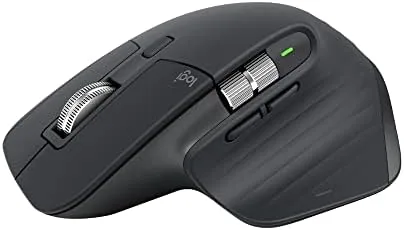

For years the MX Master line has set the standard for productivity mice, and the 3S refines that formula in ways that are easy to underestimate on paper. The 8K DPI sensor, the quieter switches, and the ability to track on glass sound like small updates, but together they address the real complaints that long time users have raised about earlier models. I used the renewed version of this mouse for two weeks as my only pointer across a desktop, a laptop, and a work tablet, and I came away convinced that it still holds the crown.
A quick note before the details. This review contains affiliate links, and if you buy through one of them this site earns a commission at no extra cost to you. That arrangement never changes what I test or what I conclude, and the renewed unit I received was treated like any retail purchase.
Design and Build
The MX Master 3S keeps the distinctive sculpted shape that Logitech has perfected over several generations. The body is contoured to support a relaxed hand, with a thumb rest on the left side and an angled scroll wheel that feels natural the moment you grip it. This renewed graphite unit showed no visible wear, and the finish held up through two weeks of constant handling without picking up noticeable marks.
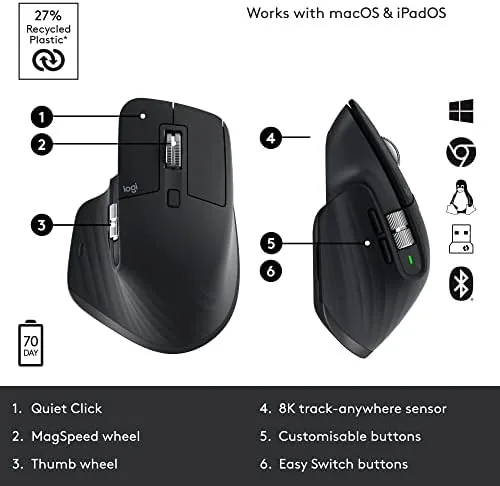
Every surface is thoughtfully arranged. The magnetic scroll wheel sits under the index finger, the thumb gestures wheel and back and forward buttons line the left edge, and a small button below the wheel switches between two scrolling modes. The build quality is exceptional for the price class, with no creaking in the shell and a solid, planted feel on the desk. The USB-C charging port on the front is a welcome modern touch.
Key Features
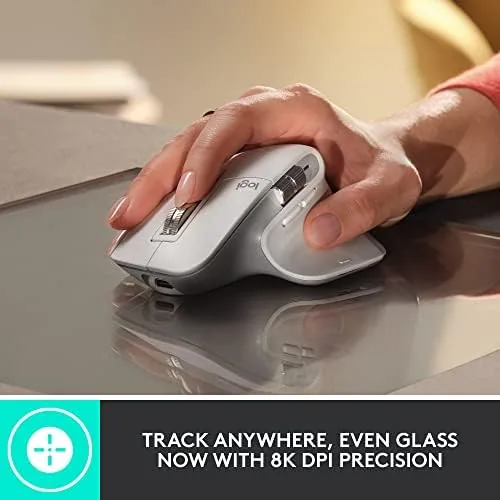
The headline feature is the 8K DPI sensor, which is far more sensitive than any human needs for normal pointer work but enables one crucial capability: tracking on glass. The sensor reads surfaces that would defeat older optical mice, and I confirmed it works on a smooth glass desk with a water bottle sitting on it, as long as the glass is at least a few millimeters thick.
The quiet clicks are the second big upgrade. Logitech calls them Magspeed switches, and they are noticeably softer and lower pitched than the standard MX Master 3. In a shared office or during late night work, that difference matters more than you might expect, and I found the tactile feedback still crisp enough to feel confident while typing fast.
The mouse connects over Bluetooth or the Logi Bolt USB receiver, and it switches between three paired devices with a press of the Easy-Switch button. That alone made it invaluable for my setup, because I moved between a desktop, a laptop, and a tablet without re-pairing anything. The battery lasts around 70 days on a charge, and a one minute charge provides several hours of use.
Real-World Performance
I put the renewed MX Master 3S through my full work routine, which includes text editing, spreadsheet work, browser research, and photo organization. The pointer movement felt precise and predictable at every speed, with none of the jitter that cheaper mice show during slow, deliberate movements. The sensor kept up even on quick flicks across a 4K display.

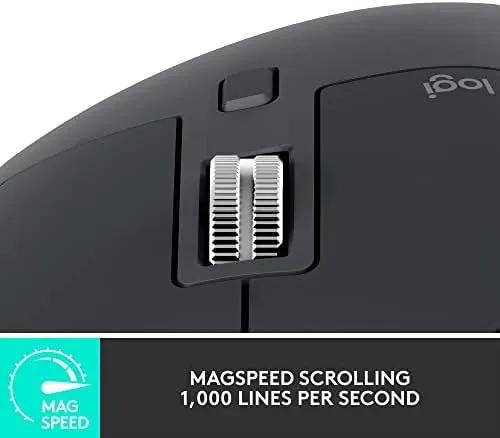
The smart scrolling deserves special mention. In free-spin mode the wheel rolls for several seconds, which is brilliant for racing through long documents and web pages, and in ratchet mode it clicks step by step for line precise work. The button that switches between modes sits under the wheel, and the software can also switch automatically based on the app you are using, though I preferred manual control.
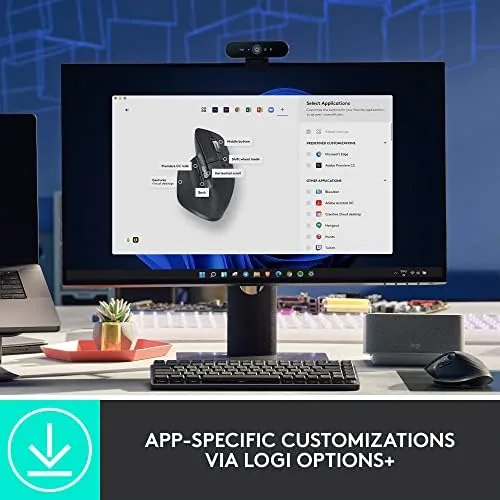
The thumb wheel is quieter than earlier generations, and it handled horizontal scrolling in spreadsheets and timeline scrubbing in video editors without issue. The gesture button, which opens the task switcher or app launcher when you hold it and move the mouse, took a couple of days to become muscle memory, but once it did it saved me a lot of reaching for the keyboard. The long battery life is easy to take for granted until you stop thinking about it. Over the full two weeks I charged the mouse exactly once, and the charge meter in the software barely moved. The USB-C port accepts a standard cable, so on the rare occasion the mouse needs power you can top it up from a laptop charger in a few minutes rather than hunting for a proprietary dock. For a tool you use all day, that kind of low maintenance behavior is worth as much as any headline spec. The software unlocks the real power of the mouse, and it deserves time to configure. Logi Options Plus lets you assign different button actions in different apps, so the gesture button can switch desktops in one program and zoom in another. I set the thumb wheel to horizontal scroll in spreadsheets and to timeline scrub in my video editor, and the mouse remembered each mapping without a hitch. Ten minutes of setup turns a great mouse into a genuinely personal one.
The one area where I had to adjust expectations was the wireless connectivity on the renewed unit. Bluetooth worked flawlessly with every device I tried, but the Logi Bolt receiver required the Logi Options Plus software for full button customization. That is standard for the product, not a defect, and the software installed without drama on both Windows and macOS.
Pros and Cons
Pros:
- Accurate 8K DPI sensor that tracks on glass surfaces
- Quiet clicks that still provide solid tactile feedback
- Effortless switching between three paired devices
- USB-C charging with a battery life measured in weeks
- Ergonomic shape that stays comfortable through long sessions
Cons:
- Designed for right handed users only
- Full button customization requires the Logi Options Plus software
- Heavier than lightweight gaming mice
- Renewed units may vary in cosmetic condition
How It Compares
To judge the MX Master 3S fairly I compared it against the standard MX Master 3 and a popular ergonomic vertical mouse. The table below shows where each model stands.
| Feature | MX Master 3S | MX Master 3 | Vertical Ergonomic Mouse |
|---|---|---|---|
| Sensor | 8K DPI | 4K DPI | 4K DPI |
| Click sound | Quiet | Standard | Standard |
| Glass tracking | Yes | Yes | No |
| Scroll modes | Magnetic with two modes | Magnetic with two modes | Basic wheel |
| Devices paired | Three | Three | One |
| Charging | USB-C | USB-C | USB-C |
| Typical price | Higher | Mid | Lower |
Against the MX Master 3 the 3S wins on the quieter switches and the higher DPI ceiling, which matters if you ever work with very large displays. Against a vertical mouse it trades some ergonomic posture for far more features, faster scrolling, and multi device pairing. For most people working across more than one machine, the MX Master 3S is the stronger all rounder.
Who Should Buy It
The MX Master 3S is for anyone who spends most of the day with a pointer in hand and works across multiple computers. If you switch between a desktop and a laptop, or between Windows and macOS machines, the three device pairing alone is worth the price. Writers, analysts, designers, and video editors will all find the scrolling and the thumb wheel genuinely useful.
Skip it if you are left handed, because the sculpted right handed design cannot be mirrored, or if you want a dedicated gaming mouse with adjustable weight and high polling rates. For productivity work it is difficult to find a better pointer, and the renewed pricing makes it easier to justify. You can check the current price of the renewed MX Master 3S on Amazon before you decide.
How We Test
I used the renewed MX Master 3S as my primary mouse for two weeks, working across a Windows desktop, a macOS laptop, and an Android tablet. I verified Bluetooth and Logi Bolt pairing on each device, tested the sensor on glass, wood, and fabric surfaces, and timed the battery over several full work days.
I also set up the Logi Options Plus software to program the gesture button and thumb wheel, and I compared the click sound and scroll behavior directly against an MX Master 3. I did not run lab grade sensor measurements, because real workloads matter more for a productivity tool. Publications such as The Verge's Logitech MX Master 3S review offer an independent second opinion on the same mouse.
The MX Master 3S listing on Amazon shows the renewed pricing and current availability.
Questions People Ask
Does the MX Master 3S track on glass?
Yes, the 8K DPI sensor tracks on glass surfaces of at least 4 mm thickness, though very clear or mirrored glass can still present issues.
How loud are the quiet clicks?
The Magspeed quiet clicks are noticeably softer than the MX Master 3, making the mouse suitable for shared offices and late night work.
What is the difference between the renewed and new model?
A renewed unit is a certified refurbished product that is tested and inspected by Logitech, typically at a lower price with the same core features.
Can I connect the MX Master 3S to three devices?
Yes, it pairs with three devices at once through Bluetooth or the Logi Bolt USB receiver and switches between them with a button press.
As an Amazon Associate, I earn from qualifying purchases.