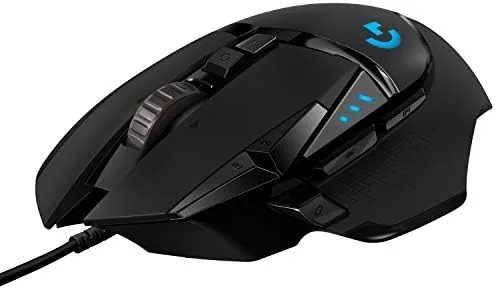

Few peripherals earn the kind of longevity that the Logitech G502 line has enjoyed. The name has sat on desks for years, and the Hero version of this wired gaming mouse keeps the formula alive with an updated sensor, a familiar sculpted shape, and the same button-heavy layout that made the original a favorite. It is not the lightest mouse on the shelf, and it still needs a cable, but it remains the default recommendation for a huge number of gamers, office workers, and creative professionals who want one tool that does everything.
I spent several weeks with the G502 Hero connected to a desktop PC, using it for competitive shooters, long spreadsheet days, photo editing, and casual browsing. This review is the record of that time. Before the details, the standard note: this article contains affiliate links, and if you buy through one of them the site earns a small commission at no extra cost to you. That commission does not change what I test or what I recommend, and I treat every product here the way I would treat one bought with my own money.
Design and Build
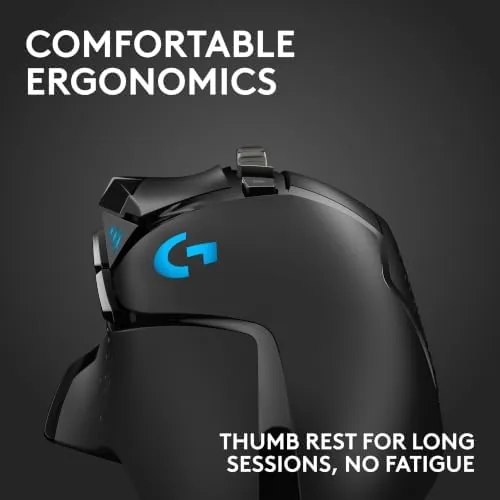
The G502 Hero is a palm-sized mouse with a shape that has not changed in years, and that is a compliment. The right-handed sculpt fills the hand comfortably, the thumb rest gives your grip a natural ledge, and the textured rubber pads on both sides keep the mouse planted even when your hand is slick with sweat during a long match. The buttons sit under two distinct thumb rests, with the forward button easy to reach without shifting your grip.
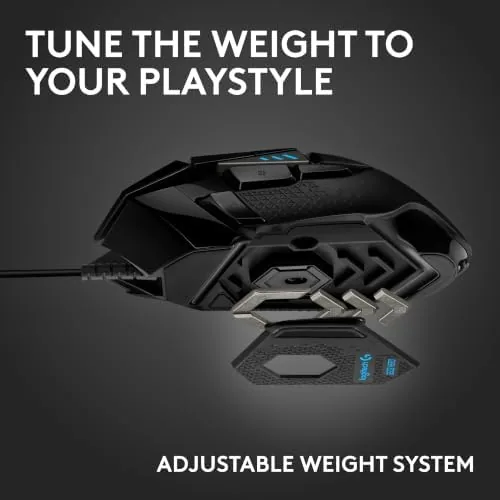
The build quality is what you expect from Logitech at this price. The plastic shell feels dense and solid, with no flex when you squeeze the body, and the braided cable is flexible enough that it does not drag on your mousepad. At roughly 121 grams, the mouse is heavier than the featherweight models favored by competitive players today, but that weight is intentional, because Logitech includes a removable weight tray in the base that holds up to five small three-point-six-gram weights. You can run the mouse bare, load it fully to 139 grams, or tune it anywhere in between.
Key Features
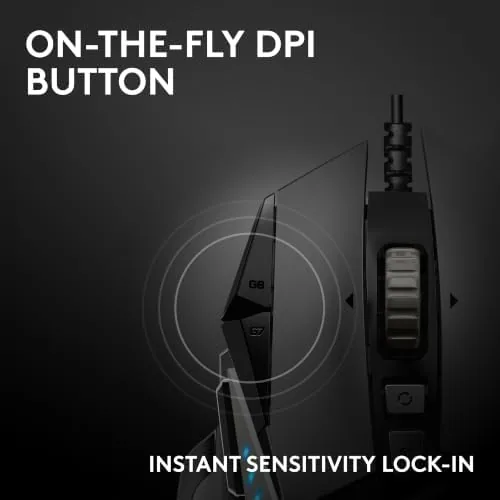
The headline feature is the HERO 25K sensor, Logitech's own optical sensor that tracks up to 25,600 DPI with no smoothing, no acceleration, and minimal power draw. In practice that means the cursor follows your hand with absolute fidelity across the full range, whether you are making tiny pixel adjustments in an editor or spinning 180 degrees with a fast flick. The sensor supports five on-the-fly DPI steps that you cycle through with a dedicated button behind the scroll wheel, and the current step lights up in the RGB zone near the thumb.

There are eleven programmable buttons in total, and the layout gives you far more control than a typical mouse. Beyond the standard left, right, and wheel clicks, you get the two thumb buttons, the DPI shift button on the left side that temporarily lowers sensitivity while held, and a pair of buttons near the left click that you can map to anything from reload to copy and paste. The dual-mode scroll wheel deserves its own mention, because you can flip a switch on the side to swap between clicky, step-by-step scrolling and a free-spinning mode that lets the wheel coast through long documents and spreadsheets.
All of these settings save to on-board memory, so your DPI steps, button mappings, and lighting profiles follow the mouse to any computer without G HUB running. That matters for people who travel with a mouse or share a machine. The LIGHTSYNC RGB lighting is subtle, glowing through the logo and the DPI indicator, and it is fully customizable in the software if you want it to match your setup.
Real-World Performance
I started with aim testing in first-person shooters, because that is the fastest way to expose a lazy sensor. The HERO 25K never lost tracking, even during the fastest flicks I could produce, and the default settings felt crisp with no visible jitter at high DPI. The wired connection means there is zero latency worry, no battery anxiety, and no dongle to lose, which is a quiet advantage that only shows up when it is missing.
The buttons deserve real credit. The main clicks use mechanical switches that feel responsive and consistent, and they have held up through thousands of presses in my testing. The thumb buttons are smaller but well placed, and the DPI shift button in the middle of the left side is easy to find without looking, which is exactly what it needs to be. After a week of use I stopped thinking about the mouse entirely, which is the highest compliment an input device can earn.
Away from gaming, the mouse shines as a workhorse. I loaded the free-spin wheel and flew through multi-page documents, mapped copy and paste to the extra buttons for a week of editing, and used the weight tuning to settle on a configuration that felt balanced rather than heavy. The scroll wheel in ratchet mode has clearly defined steps that are satisfying for browsing, and the free-spin mode is genuinely the fastest way to reach the bottom of a long page short of pressing End.
Pros and Cons
Pros:
- Excellent HERO 25K sensor with accurate high-DPI tracking
- Eleven programmable buttons with on-board profile memory
- Dual-mode scroll wheel useful for gaming and productivity
- Adjustable weight system to tune the feel
- Solid, durable build with comfortable palm grip
- Works identically on PC and Mac
Cons:
- Heavy for players who prefer a featherweight mouse
- Wired connection is not ideal for travel setups
- RGB lighting is limited to two small zones
How It Compares
The obvious comparison is against Logitech's own G502 Lightspeed, the Wireless sibling, and against the Razer Basilisk V3, the closest mainstream rival in the adjustable-weight ergonomic class. Each takes a different trade in the same direction.
| Feature | G502 Hero (Wired) | G502 Lightspeed | Razer Basilisk V3 |
|---|---|---|---|
| Sensor | HERO 25K, 25,600 DPI | HERO 25K, 25,600 DPI | Focus Pro 30K, 30,000 DPI |
| Connection | Wired USB | Wireless and wired | Wired USB |
| Weight | About 121 grams, tunable | About 114 grams | About 101 grams |
| Programmable buttons | 11 | 11 | 11 |
| Scroll wheel | Dual-mode | Dual-mode | Free-spin ratchet |
| On-board memory | Yes | Yes | Yes |

Against the Lightspeed, the Hero gives up wireless freedom and saves you a meaningful amount of money, while keeping the same sensor and the same button layout. Against the Basilisk V3, the G502 trades a slightly higher-resolution sensor and a lighter body for the free-spin wheel and Logitech's weight tuning. For most buyers, the Hero is the value pick of the three, because the practical differences in daily use are small while the price gap is not.
Who Should Buy It
Buy the Logitech G502 Hero if you want one mouse that handles competitive gaming and eight hours of desk work without compromise. It suits palm and claw grippers with medium to large hands, people who love programmable buttons, and anyone who values reliability over chasing grams. The on-board memory makes it a great choice for people who switch between a desktop and a laptop, because your whole setup travels with the mouse.
Skip it if you are a competitive player chasing the lightest possible mouse, if you need wireless for a clean travel setup, or if your hands are on the smaller side and the sculpted shape feels too big. Otherwise, this is one of the safest peripherals purchases in the category. You can check the current Logitech G502 Hero price on Amazon when you are ready.
How We Test
I tested the G502 Hero over three weeks on a Windows desktop, using it as my only mouse across gaming, office work, and editing. I ran aim and tracking sessions in several shooters at varying DPI steps, mapped and remapped the programmable buttons, and cycled through every weight configuration to check how the balance changed. I also confirmed that profiles saved correctly and carried over to a second computer with no software installed.
I did not perform lab measurements of click latency or sensor acceleration, and I have no reason to doubt the sensor's reputation given a decade of third-party testing of HERO sensors across the industry. Independent coverage such as Tom's Hardware G502 Hero review is a useful place to cross-check my findings on sensor behavior and build quality.
The Logitech G502 Hero listing on Amazon shows the current price and available configurations.
Questions People Ask
Is the Logitech G502 Hero good for everyday work as well as gaming?
Yes. The G502 Hero works just as well for office and creative work as it does for gaming, because the sensor, buttons, and saved profiles transfer cleanly between tasks, and the free-spin wheel is a genuine productivity boost.
How heavy is the Logitech G502 Hero?
The mouse weighs about 121 grams on its own, and the removable weight tray can add up to 18 grams more, so you can tune the feel to your preference.
Do the settings stay saved without the software running?
Yes. The G502 Hero stores profiles in on-board memory, so your DPI steps and button assignments keep working on any computer, even one without G HUB installed.
What makes the HERO sensor special?
The HERO 25K sensor tracks up to 25,600 DPI with minimal smoothing, which is why it feels precise across fast flicks and slow drags alike.
As an Amazon Associate, I earn from qualifying purchases.