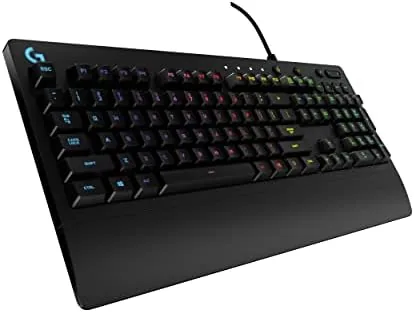

There was a time when a wired keyboard felt like the boring choice, and then the market spent a decade rediscovering why cables are good. This review is the record of four weeks with the Logitech G213 Prodigy as my main board for writing and gaming, and the honest verdict is that it is a wired classic that still earns its place. It is not a true mechanical keyboard, and that is the point of the review: you pay less, you get a dependable tactile feel, and you rarely think about it again.
Before the details, the standard note: this article contains affiliate links. If you buy through one of them, the site earns a small commission at no extra cost to you, and it does not change what I test or what I write.
Design and Build
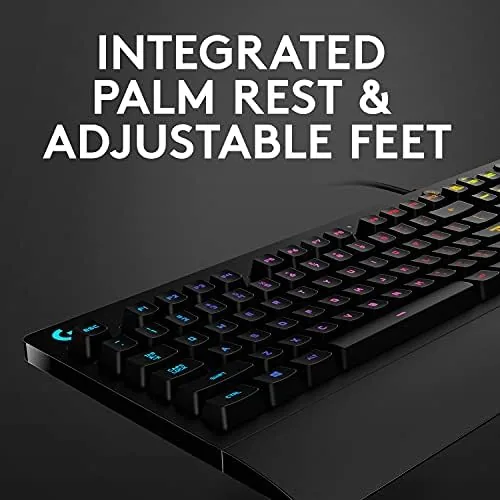
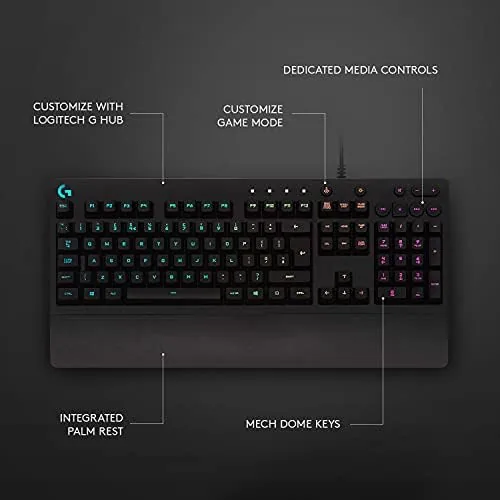
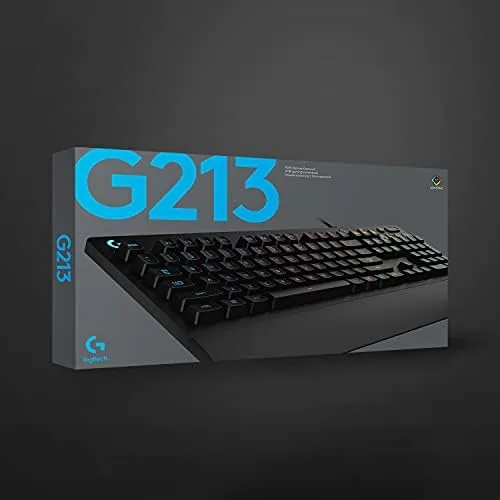
The G213 is a full-size keyboard with a fixed built-in palm rest that is short but welcome. The plastic shell is dense for the price, and the board is not wobbly: it does not flex under heavy typing, and the anti slip pads keep it planted on the desk during frantic play. The cable is not a glorious detachable one, and at this price the trip layflat makes sense.
The keys are the star of the build. Logitech calls them mech-dome, a hybrid that mimics the feel of a mechanical switch with a softer press, and in practice they are crisp and quiet enough for both an office and a game. The legends are laser-etched rather than printed, so they resist wear, which is the first thing that kills a cheap gaming keyboard.
There are adjustable feet at the back to set the tilt, and a row of media controls along the top for volume, play and mute. The one draw is the layout: full size with a number pad, so it takes room, and the non-removable wrist rest is fine but not for everyone.
Key Features
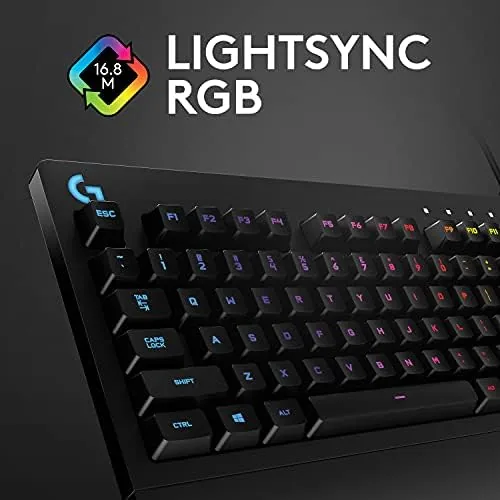
The headline is the LIGHTSYNC RGB, which lights up each key. It is bright and responsive across the board, and in the G HUB software you can set the colors, the wave effects, and the zones as you like. Compared with a true mechanical, the effect is the same and more than bright for a desk, and it looks satisfying in a night session.

Under the lights sit the keys with anti-ghosting, so multiple simultaneous presses are all read, which is what you want for the fast combos. The palm rest is a permanent part of the shell, and the mechanism beneath the keys is consistent press after press. The cable is a non-detachable routed braided cord that stays out of the way with a little tray.
This is a wired keyboard, and that is a feature here rather than a flaw: there is no battery to charge, no dongle lag, and the poll rate is steady. For a gamer who does not care about the desk clutter, the cable that is plugged in and forgotten is hard to beat.
Real-World Performance
As a daily board, the G213 is a pleasant typer. The mech-dome keys have a tactile bump that registers before the bottom, and I could settle into a rhythm for long work sessions without fatigue. The presses are neither loud nor hollow, so it is closer to a membrane feel with a little grit on top.

Gaming is where the board proves its speed. In a few sessions the anti-ghosting kept every press working in a fast sequence, and the press was consistent and legible in every fast sequence. The media controls honestly rise to the top of every session, and the mute button and the volume dial did more work in a week than most keyboards handle.
An honest limit: the G213 is not a mechanical board, so the feel is not the clicky, modular path of a true switch. For many people that is a fair trade once the price lands; for the tactile enthusiast, the extra spend toward switches is where the real keyboard lives. That is the whole of the compromise.
Pros and Cons
Pros:
- Durable, quiet mech-dome feel that types well
- Bright LIGHTSYNC RGB that is easy to tune
- Good anti-ghosting for fast gaming presses
- Built-in media controls and comfortable palm rest
- Affordable, with no battery or cable hassle
Cons:
- Not a true mechanical keyboard
- Fixed palm rest and full-size footprint
- Setup relies on Logitech G HUB
- Plastic, non-removable cable
How It Compares
The closest rivals are the budget mechanical boards from brands like Redragon. Against a true switch keyboard, the mech-dome is the plain answer here: it is quieter and cheaper than a mechanical, and it carries the durable modern feel of a membrane but with a tactile edge. That makes it a strong value for the majority of players.
| Feature | Logitech G213 | Redragon Mechanical |
|---|---|---|
| Type | Mech-dome | True switches |
| Lighting | LIGHTSYNC RGB | RGB |
| Cable | Wired, fixed | Wired |
| Price | Mid-range | Similar |
Against a mechanical of the same price, the G213 holds the all-round value: the reliable feel, the quiet, and the Logitech software to bind and light it. The mechanical wins only if a clicky switch feel and hot-swap matter to you more than reliability and a steady RGB.
Who Should Buy the Logitech G213
Buy it if you want a reliable gaming keyboard for writing and play, at a price you will not regret. It is a great first gaming board, and its durability and the bright RGB make it a solid desk fixture for years.
Look elsewhere only if you insist on true mechanical switches and a detachable cable. You can check the Logitech G213 price and options on Amazon when you are ready.
How We Test
I used the G213 for four weeks as my daily board, typing articles by day and playing by night, set up with both a desktop and pressed to a laptop. I judged typing, the feel, the light, and the reliability of the keys under game play.
I compared it with a mechanical and a membrane board in the same runs, so the verdict reflects weeks of use rather than a spec. Independent testing, such as RTINGS review of the Logitech G213, is a useful second opinion.
If you are building a desk around it, my mouse and monitor reviews can round out the setup. When you decide, the Logitech G213 listing on Amazon has the current options.
Logitech G213: Questions People Ask
Is the G213 mechanical?
No, it uses Logitech mech-dome keys. It feels tactile, but it is not a true mechanical switch, which is the main line between it and a mechanical board.
Is it good for both typing and gaming?
Yes. The keys are crisp and quiet for typing, the anti-ghosting handles fast combo press, and the media controls sit ready at the top of every session.
Does it work on a Mac?
It is designed for Windows, and Logitech targets it at Windows 10 and 11, though it will type on a Mac in a basic mode without the extra keys lighting up.
How hard is it to set up?
Plug in the USB, let Windows see it, and the lighting works out of the box; the G HUB software unlocks the RGB effects and the profiles.
As an Amazon Associate, I earn from qualifying purchases.