
If you have watched a single streamer or listened to a single podcast in the past decade, you have already met the Blue Yeti. This is the microphone that made serious sound accessible, the silver tower that has sat on millions of desks since it first paired its condenser capsule with a plain USB connection. This review is the record of a month using it fresh in 2026, to answer whether the original creator standard still holds up when so many cheaper rivals have appeared.
Before the details, the standard note. This article contains affiliate links. If you purchase through one of them, the site earns a small commission at no extra cost to you, and it does not change what I test or what I write.
Design and Build
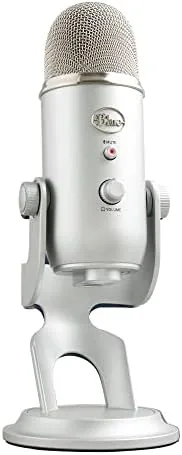
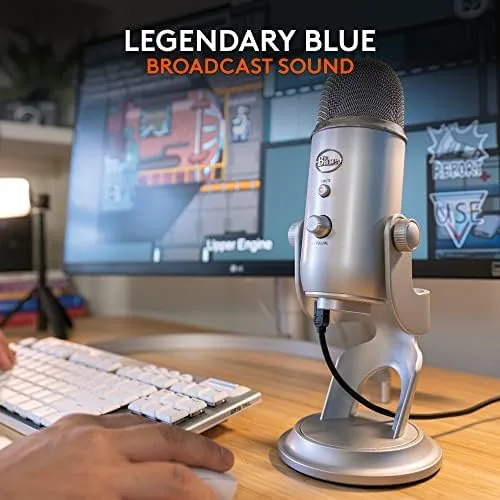
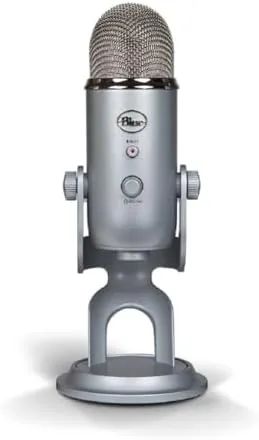
The Yeti is heavy, and that is fine. It is a substantial slab of metal finished in silver, with a retro brass-hued grille that reads instantly as a Blue product, and it arrives on a sturdy metal base that holds it at a sensible talking angle. The weight does the job: the microphone stays planted on a desk, and the included threaded mount opens it to any Boom Arm if you want it off the surface.
The build is genuinely solid. The metal body has no cheap give, the grille is well attached, and the base is filled with enough mass that the microphone barely tips even when you bump the desk. Up top there is a mute button and a volume dial, and the back carries the microphone node, headphone jack, and gain knob. It is the sort of hardware that was clearly overbuilt to sit on a desk for a decade.
It does ask for room. The Yeti is a tall, wide microphone and its included table stand takes up a fair share of the desk, so a tidy gamer will often move it to a boom arm before long. That aside, the hardware feels premium and ready for the long haul.
Key Features
The headline is the four pickup patterns. A dial on the back lets you choose cardioid for one voice, bidirectional for a face-to-face interview, omnidirectional for a whole room, and stereo for a broader, widely placed sound. This flexibility is the Yeti\'s biggest advantage over the single-pattern microphones that have crowded the market since its release.
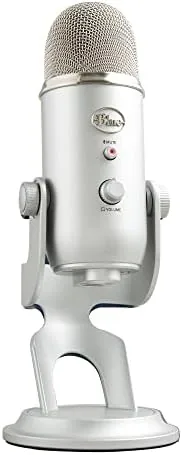
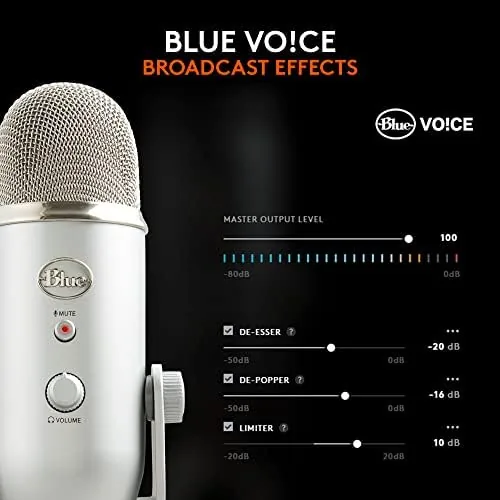
It uses three condenser capsules, which is why it can switch between patterns, and the capsules produce the full, warm sound that made the Yeti famous. It connects over a plain USB and is plug and play on Windows and macOS with no drivers, so it is one cable away from working in a stream, a podcast, or a call. Logitech and Blue now fold in VO!CE effects, ready-to-use presets for livestreamers and the gamer pipeline.
There is a headphone jack with real-time zero-latency monitoring on the front, a mute button with a light that shows when you are live, and a gain knob for tuning. For the creator who wants to set up and start, it is genuinely all in the box.
Real-World Performance
A month of streaming and dictation was a comfortable test. Set to cardioid, the Yeti captured a clear, full vocal that is the foundation of its fame, with the low end present and the top of the range bright, and it handled light compression from a broad condenser without the thin, brittle tone you fear from a cheap mic.

The hot reality is that a condenser captures a lot. In a quiet, treated room the Yeti shines, and its presence capsule is a strong tool for a single host. In a clicking or echo-heavy room it picks up more of that chatter than a dynamic microphone would, so it rewards a desk with some acoustic care, a foam shield, and a bit of distance or a renewable gate in your software.
The VO!CE effects are a genuine help for a nervous ear. Applying a broadcast preset cleaned up the top end and warmed the low, and it is the kind of one-click polish that makes a streamer sound better on day one without a chain of plugins. Between the mute button, the patterns, and the handful of presets, the Yeti gives you a tool that you can grow into rather than out of instantly.
Pros and Cons
Pros:
- Four pickup patterns make it flexible for interviews, a room, or one voice
- Warm, full condenser sound that needs little processing
- Blue VO!CE effects add clean one-click polish
- Plug and play over USB with zero-latency monitoring
- Solidly built to sit on a desk for years
Cons:
- Picks up more room noise than a dynamic microphone
- Large and heavy, uses a lot of desk space
- No XLR output, so no direct path to an audio interface
- Needs some room treatment or processing in a live room
How It Compares
The rivals are the cheaper one-pattern USB mics and the newer hybrid that replaces USB with XLR. Against a low-end single-pattern USB mic, the Yeti wins on sound quality and the flexibility of four patterns, and it is the pick for anyone who might grow into interviews before they buy a studio. Against a hybrid USB and XLR microphone, it trades that future XLR option for a simpler all-in-one at a lower price.
| Feature | Blue Yeti | Budget USB Condenser |
|---|---|---|
| Pickup patterns | Four | One |
| Connection | USB only | USB |
| Effects | Blue VO!CE | Usually none |
| Warm sound | Yes, three capsules | Varies |
| Desk footprint | Large | Smaller |
Who Should Buy
Buy a Blue Yeti if you stream, podcast, or record voice on a desktop and you want a proven, warm mic that is ready to go over USB. It is a great first professional step for a beginner who wants the flexibility to move from one person to an interview, and it is still the single best spur for someone buying their first serious voice tool.
Skip it if you work in a noisy room you cannot treat, prefer a tight dynamic for a quiet study, or want to switch to XLR right away. For a desk creator, though, it remains the honest default. You can check the Blue Yeti price on Amazon before deciding.
How We Test
I used the Yeti for a month across streams, recordings, podcasts, and meetings, testing all four pickup patterns by moving its lobes and placing the capsules. I tested the VO!CE presets against a flat setting, ran the noise floor in a live room, and compared it with a single-pattern USB condenser and an XLR dynamic, judging on the voice clean and power through my desk setup without a luxury booth.
Independent testing, such as the regular coverage in PCMag\'s Blue Yeti review, offers a solid second opinion on the same microphone. My verdict comes from a month of desktop living, so treat it as the record of a real creator rather than a spec sheet.
The Logitech Blue Yeti USB microphone listing on Amazon has the current price and color choices.
Questions People Ask
Is the Blue Yeti good for streaming?
Yes. It plugs straight into a PC or Mac, sounds clear and warm, and the VO!CE effects polish the audio without a pile of extra plugins.
What are the four pickup patterns for on the Blue Yeti?
Cardioid captures one person ahead, bidirectional suits a face-to-face interview, omnidirectional picks up a whole room, and stereo captures a wide sound field.
Do I need drivers to use the Blue Yeti?
No. It is plug and play over USB on both Windows and macOS, so you can record within a minute of connecting, no driver install needed.
Is the Blue Yeti worth it in 2026?
For voice work like streaming, podcasts, and meetings, yes, it still delivers a rich tone and remains as strong a buy as ever. Creators who want to move to XLR later should also look at a hybrid microphone.
As an Amazon Associate, I earn from qualifying purchases.