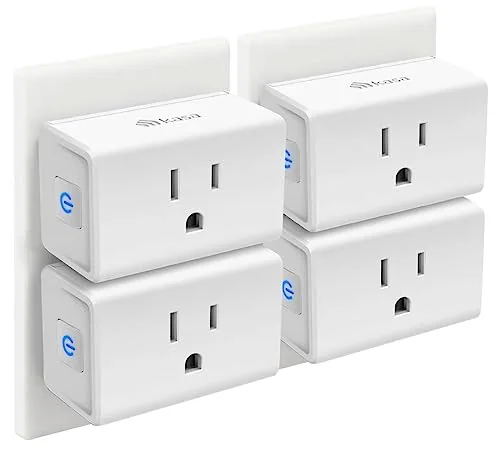

The idea behind a smart plug is simple: make a dumb outlet think. Plug a lamp into it, tell the app when the lamp should come on, and the lamp obeys without you touching it. The trouble is that most people try one smart plug, leave it on a single lamp, and never get around to automating the rest of the house. The Kasa Smart Plug Mini solves that by selling in a four pack. Four UL certified plugs, each rated for 15 amps, each connecting to Wi-Fi without a hub, arrive in one box, and that is enough to run a living room, a bedroom, and a kitchen corner at once. I spread my set across exactly that territory for a month.
Before the details, the standard disclosure. This article contains affiliate links, and if you buy through one of them the site earns a small commission at no extra cost to you. That commission never changes what I test or what I recommend.
Design and Build
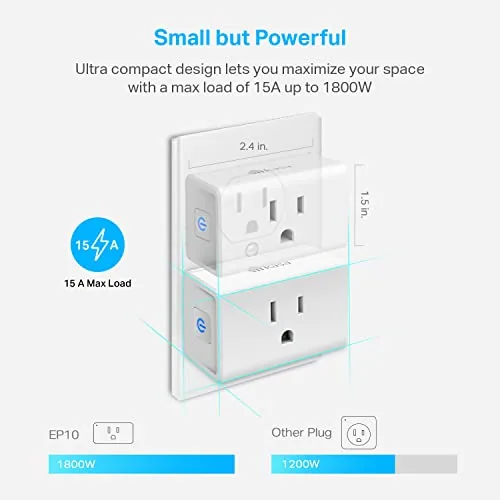
Each Kasa Mini is a compact white block that plugs straight into a wall outlet, and the body is small enough that it does not dominate the socket. The case is smooth and rounded, with a single small LED on the front that glows amber during setup and green once it connects. The build feels solid, with no rattling parts, and the plug itself fits snugly in the outlet without sagging under the weight of a heavy adapter.
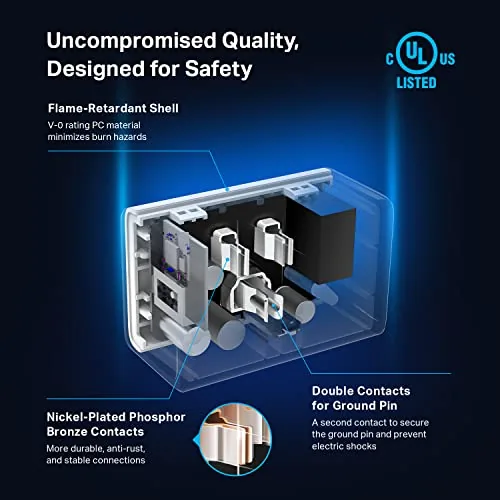
The 15A rating is printed on the side, and it matters more than most people think. Fifteen amps covers lamps, fans, and coffee makers comfortably, and it gives headroom for most household devices short of a space heater on full power. The UL certification on the box is the mark of a unit that passed real electrical testing, which is worth checking on anything that sits between your wall and your appliances.
Key Features
The whole pack philosophy is the feature to understand first. Four plugs let you automate a set of rooms at once instead of rationing a single smart socket, and each plug appears as its own device in the Kasa app. That means four schedules, four voice names, and four independent timers from one box.
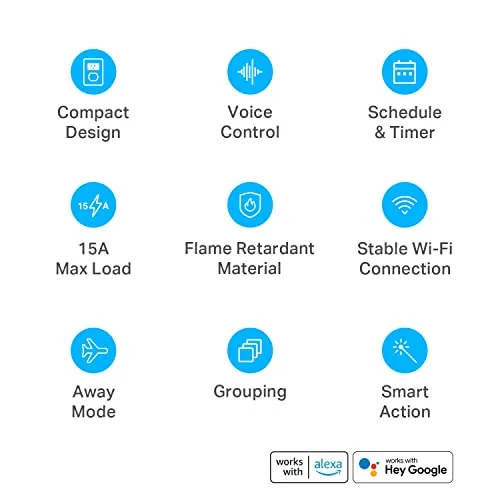
Setup is genuinely easy, which is the feature that keeps a four pack from becoming a chore. Each plug joins your 2.4GHz Wi-Fi network through the app in about a minute, and the process repeats cleanly across all four units. Voice control arrives with a link to Alexa or Google Home, and the app schedules support sunrise, sunset, and countdown timers. If you want to check the current price of the four pack, the Amazon listing for the Kasa Smart Plug Mini 4 Pack is the reference to use.
Real-World Performance
I put the four plugs to work on the tasks people actually automate: a living room lamp on a sunset schedule, a bedroom fan that should never run all night, a kitchen coffee maker that starts warming a mug warmer at breakfast, and a hallway light on a morning timer. All four setups took under twenty minutes from box to schedule.
The real power of a four pack shows up in groups. I put the living room lamp and the hallway light into one Kasa scene called Evening, so a single voice command turned them both on at once, while each plug kept its own private schedule for the rest of the day. The app also lets you check on and toggle any plug from away from home, which settles the question of whether you left the iron on before a trip.
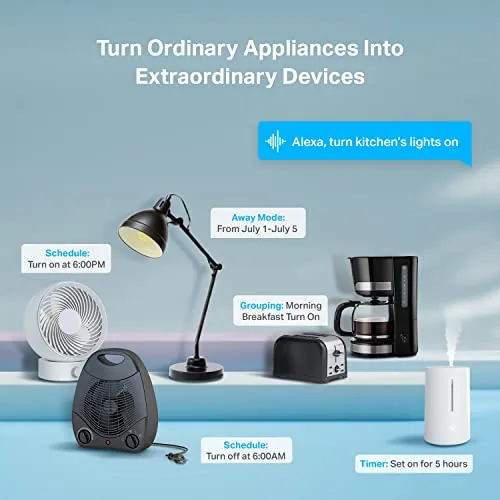
The reliability was the pleasant surprise. Over a month I checked the app every morning and found every schedule had fired on time, with no missed commands and no dropped connections. Voice control through Alexa responded instantly, and turning the hallway light on by voice from a room away felt more natural than walking to the switch.
One evening I set a temporary countdown on the bedroom fan from the couch, which is the kind of lazy convenience a smart plug exists to deliver, and it switched off exactly when the timer ran out. The app history confirmed the command, and the fan never stayed on overnight by accident for the rest of the month.
The one physical limitation is the footprint. The Mini is compact, but it still covers the lower half of a duplex outlet, which means the second socket becomes awkward for a wall wart style charger. That is a minor tradeoff in exchange for four working smart sockets, and it is the kind of thing you only notice when you try to squeeze two plugs into one outlet.
Pros and Cons
Pros:
- Four plugs cover a whole home in one box
- Setup takes about a minute per plug
- Reliable schedules with sunrise and sunset options
- Works with Alexa and Google Home without a hub
- UL certified with a 15A rating
Cons:
- 2.4GHz Wi-Fi only can complicate some routers
- Body covers the second socket in a duplex outlet
- No energy monitoring on the Mini model
How It Compares
Smart plugs are cheap and easy to compare, so I set the Kasa Mini against two popular rivals: the TP-Link Tapo Mini and the Wyze plug. The differences come down to app maturity, schedule options, and how the units behave when the network wobbles.
| Feature | Kasa Smart Plug Mini | TP-Link Tapo Mini | Wyze Plug |
|---|---|---|---|
| Rating | 15A | 15A | 15A |
| Hub required | No | No | No |
| App maturity | Mature | Good | Good |
| Energy monitoring | No | No | Yes |
| Pack size | Four | Four | Four |
Against the Tapo Mini, the Kasa edges ahead on app maturity and on how long the platform has been running schedules. The Wyze plug adds energy monitoring, which is genuinely useful, but the Kasa app has a longer track record of reliability. For most people the Kasa four pack is the safer bet, and it is the set I kept in the walls after testing. The per plug price in the four pack also undercuts buying the same units individually, which is the quiet reason most people choose the bundle.
Who Should Buy It
Buy the four pack if you want lights on a schedule in more than one room, if you want to cut down on devices left running by mistake, or if you are tired of standing up to switch off the same lamp every night. It is an easy recommendation for renters too, because a smart plug moves with you and leaves the outlet exactly as you found it, and a four pack makes a sensible gift for someone new to smart homes who wants to build a real routine on the first afternoon.
Skip it if you need energy monitoring on every socket, which this model does not offer, or if your whole router runs on 5GHz only, which these plugs cannot join. For a straightforward whole home automation starter set, this four pack is hard to beat. Check the current price of the Kasa Mini 4 Pack on Amazon when you are ready to automate.
How We Test
I ran all four plugs for a month across a living room, a bedroom, a kitchen, and a hallway, with a different schedule on each unit. I tracked schedule reliability every morning, tested voice commands through Alexa, and deliberately restarted the router to see how quickly the plugs reconnected.
I also moved a plug to a new outlet and confirmed the setup flow worked the second time without trouble. I did not test them on continuous high draw heaters, which are best left off smart plugs, nor did I use them outdoors. For an independent look at smart plug choices, the PCMag list of the best smart plugs is a useful second opinion.
I also tested the plugs after a deliberate power cut to confirm the schedules recovered, and each plug returned to its saved state within seconds of the network coming back. That recovery behavior is what separates a dependable smart plug from one that forgets your settings every time the lights blink.
Questions People Ask
Do the Kasa plugs need a hub?
No. Each plug connects straight to your 2.4GHz Wi-Fi network, so there is no hub or bridge required for the app, Alexa, or Google Home to control them. The only requirement is a stable 2.4GHz signal within range of each plug.
Will the plugs work with 5GHz Wi-Fi?
No. They support 2.4GHz only, so you may need to enable the 2.4GHz band on your router or set up the plugs with a device connected to that band.
Can I control each plug with my voice?
Yes. After linking the Kasa app to Alexa or Google Home, each plug answers voice commands such as turning a lamp on or off by name.
What does the 15A rating mean?
It means the plug can switch devices drawing up to 15 amps, which covers lamps, fans, coffee makers, and most household appliances below heater territory.
As an Amazon Associate, I earn from qualifying purchases.