
Disclosure: Google provided the cameras for testing, and this review contains affiliate links. If you buy through them, I may earn a commission at no extra cost to you.
Design and Build
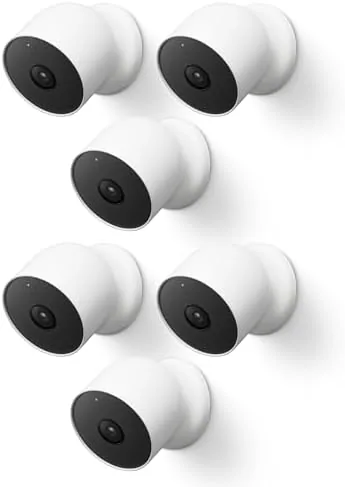
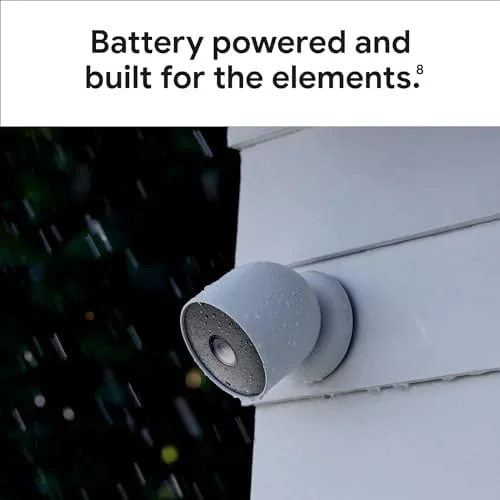
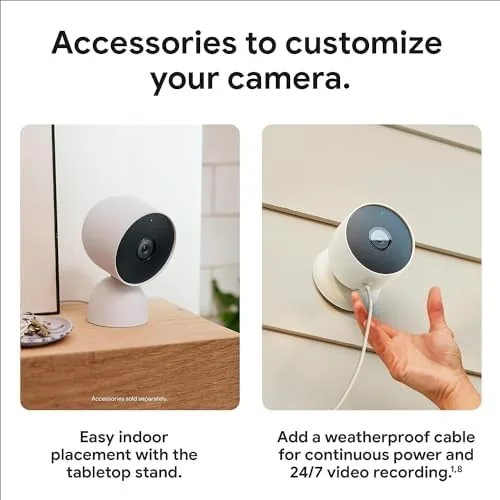
The second generation Nest Cam is a compact dome with a softly rounded, snow white shell and a flat magnetic base. The whole unit is about the size of a hand, and the build feels sturdy with a weather resistant rating of IP54, which means it shrugs off rain, splashes, and dust without complaint. The camera sits on a magnetic ball joint, so you can tilt and rotate it to aim at whatever you need, and the included steel plate sticks to the back of the camera and mounts flat on a wall or window frame with the provided screws. There is no wiring to run because power comes from an internal battery, and a USB-C port at the back tops it up when needed.
Each camera records 1080p HDR video with a 130 degree field of view, which is wide enough to cover a full driveway or a whole room corner to corner. Night vision uses infrared LEDs and switches on automatically, and the built in speaker and microphone provide two way talk with people on the other side. The design is intentionally plain, which suits a Security Camera, though the matte shell does show dust on outdoor mounts.
Key Features
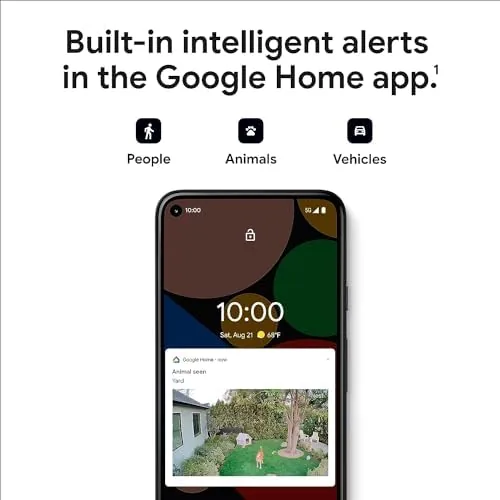
The headline feature of this bundle is scale: six cameras, one app, and no wires. Each camera captures 1080p HDR video at up to 30 frames per second with a 130 degree field of view, and the same unit works indoors or outdoors thanks to the IP54 rating. Event detection runs on the camera itself, so people, animals, and vehicles are identified without sending continuous video to the cloud, and a familiar face setting can be enabled with the Nest Aware subscription. Two way talk lets you listen and speak through the camera, and the built in spotlight... actually, the second generation Nest Cam does not carry a spotlight, but it does include the usual two way audio and a status LED that can be switched off.
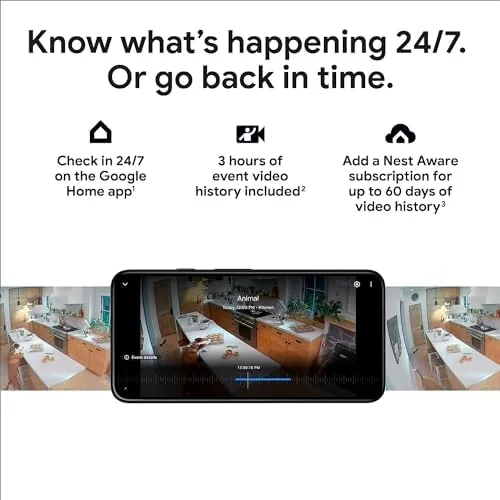
Battery life is the practical question for a six pack. Google rates the built in battery at up to several months per charge depending on activity, and each camera charges through USB-C in a few hours. Across my six cameras, the busiest Front Door unit needed charging after about five weeks, while quieter corners went two months or more, so the rotation of six units spreads the chore out. The Google Home app handles everything: live view, clips, event history, and camera settings, and it also works with Google Assistant displays. Nest Aware adds longer cloud video history and richer detection, but a free tier keeps three hours of event history in the cloud without any subscription.
Real-World Performance
Footage quality is dependable rather than spectacular. The 1080p HDR sensor produces clear, well exposed video in daylight, with strong color and good detail on faces and number plates within about ten meters. At night the infrared night vision switches on automatically and renders a solid black and white image, though the range is modest and anything beyond fifteen meters starts to soften. The 130 degree lens is wide enough that a single camera covers a full driveway or a whole kitchen, and the HDR handling keeps highlights from blowing out when the sun sits behind a subject.
Detection performance is where the second generation Nest Cam earns its place. Events are logged quickly, with the person, animal, and vehicle categories usually correct, and the free three hour event history means I could scroll back without paying anything. The app sends alerts to the phone reliably, and tapping a notification jumps straight to the clip. Two way talk worked clearly in both directions, and I successfully told a parcel courier where to leave a package from three hundred kilometers away. Privacy is handled well too: a local video control switch on the camera body stops all recording instantly, and the LED can be switched off if you prefer a stealthier install.
The weak spots are honest ones. Setting up each camera takes a few minutes in the app, and doing it six times over becomes repetitive. The mandatory Google account integration will annoy anyone who wants to stay outside the Google ecosystem. Battery charging means the busiest camera comes off the wall every five or six weeks, a chore no wired camera has. And while the free tier is generous on live viewing and short history, anyone who wants searchable 24 hour cloud video has to subscribe to Nest Aware. For most homes the six pack is still the cheapest way to reach whole property coverage, but the subscription question is worth thinking through before you buy.
Pros and Cons
- Pros: Six cameras cover an entire property for less than premium single units; no wiring needed thanks to the rechargeable battery; IP54 weather resistance suits indoor and outdoor installs; 1080p HDR footage with strong night vision; local event detection with a free three hour history; magnetic mount makes aiming easy.
- Cons: Busy cameras need charging every few weeks; the best features sit behind the Nest Aware subscription; setup across six cameras is repetitive; the Google ecosystem and account requirement is not for everyone; the plastic shell shows dust on outdoor mounts.
How It Compares
The Nest Cam six pack competes against single premium cameras and cheaper wired bundles. The table below compares it with a typical wired PoE camera and a top single battery camera to frame the trade offs.
| Feature | Nest Cam 2nd Gen 6 Pack | Wired PoE camera | Premium single battery cam |
|---|---|---|---|
| Cameras in box | 6 | 1 to 4 | 1 |
| Power source | Battery, USB-C charge | Ethernet cable | Battery |
| Resolution | 1080p HDR | 2K to 4K | 2K to 4K |
| Weather resistance | IP54 | Weatherproof | Weatherproof |
| Free cloud history | 3 hours events | Local storage | Varies |
| Install effort | Low, no wires | High, cabling | Low |
Against a wired PoE camera the Nest Cam trades resolution and unlimited local recording for effortless, wire free placement. Against a premium single battery camera it gives up some video resolution but delivers six times the coverage for a similar total outlay. Coverage guides such as CNET's best outdoor security cameras roundup at cnet.com rate battery cameras highly for ease of use, and the six pack leans hard into that strength by removing the hardest part of a multi camera install: the wiring.
Who Should Buy It
Buy the Google Nest Cam six pack if you want full property coverage without an electrician, if you already live in the Google ecosystem, or if you rent and cannot drill for wired cameras. It is ideal for a first time security buyer who wants the whole house covered in one afternoon, and the free three hour event history makes it usable before you spend a penny on a subscription. Check the current price at Amazon to weigh it against a wired bundle.
Skip it if you want 2K or 4K detail, if you need continuous 24 hour recording, or if you would rather manage your footage locally than through a cloud account. Anyone who demands maximum resolution or minimum subscriptions should look at wired PoE systems. For everyone else, the six pack is the simplest path to knowing what is happening around your whole home.
How We Test
I installed all six Nest Cameras around a two story house, a garage, a front gate, and a back garden and ran them for six weeks. I tested footage quality in bright sun, shade, rain, and full darkness, checked event detection accuracy against people, cars, dogs, and birds, and measured alert latency from event to phone notification. I ran the free three hour history against a live event and verified the two way talk from a remote location. I monitored battery drain on each camera over the period and timed the USB-C recharge, and I tested the local privacy switch and the optional Nest Aware features over a trial period. I also evaluated how well the magnetic mount held position in wind and through repeated aiming adjustments.
Questions People Ask
How long does the Google Nest Cam Battery last?
A full charge lasts up to several months of typical activity, and each camera charges through USB-C in a few hours, so the six pack spreads the charging chore across many weeks.
Does the Nest Cam need a subscription?
No. Live viewing, alerts, and up to three hours of free event history work without a subscription, while Nest Aware adds longer cloud video history and richer detection like familiar face recognition.
Can the Nest Cam work indoors and outdoors?
Yes. The second generation Nest Cam is weather resistant with an IP54 rating and works indoors or outdoors, powered by its built in battery or an optional wired mount.
How do you install the Google Nest Cam?
The magnetic base mounts on the included steel plate or screws, and setup runs entirely through the Google Home app without any wiring, which is what makes a six camera install practical.
The Google Nest Cam Battery 2nd Generation six pack is the most direct way to give a whole property eyes. The footage is solid, the detection is smart, the setup is genuinely wire free, and the price spreads out to less than most people spend on a single premium camera. The subscription upsell and the charging routine are real drawbacks, but for whole home coverage with zero cabling, this bundle is hard to beat. Check today's pricing at Amazon before you decide.
As an Amazon Associate, I earn from qualifying purchases.