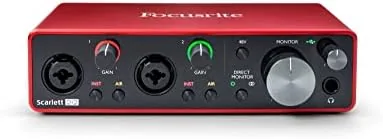

There is a moment every first-time podcaster and bedroom musician hits, usually after a mediocre recording with a built-in microphone. The hardware is not the problem, the interface between the microphone and the computer is. The Focusrite Scarlett 2i2 3rd Gen exists for that exact moment. It is a two input, two output USB audio interface that takes a real microphone or a guitar, converts the signal with professional-grade converters, and feeds it into your computer ready for the software you already have or the software bundled in the box. I recorded with it for a month, and it is the rare piece of studio gear that is genuinely easy to explain: it does one job and does it cleanly.
Before the details, the standard note. This article contains affiliate links, and if you buy through one of them the site earns a small commission at no extra cost to you. That commission does not affect what I test or recommend, and the Scarlett reviewed here was judged the same way I judge any interface.
Design and Build
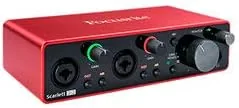
The Scarlett 2i2 is a compact metal box about the size of a paperback, finished in the dark charcoal and red livery that Focusrite has made its own. The front panel carries the two XLR and quarter-inch combo inputs, a set of knobs for gain, a halo ring that glows green for good levels and red for clipping, and the Air and instrument switches. The rear panel adds the two Monitor outputs, a headphone output, and the USB-C port that both connects and powers the unit.
The build quality is exactly what you want from gear that sits on a desk for years. The metal chassis is rigid, the knobs turn with a smooth detent, and the whole unit feels denser than its size suggests. The halo ring is more than decoration: at a glance you know whether your levels are healthy, and that visual feedback saves you from the surprise of a clipped recording.
The layout is the best part of the design. Every control is on the top face, so the unit reads like a simple control surface rather than a maze of rear-panel switches. In a month of recording I changed gain, enabled Air mode, and switched between mic and instrument inputs without once opening the manual, which is the highest praise a piece of audio hardware can earn.
Key Features
The two Scarlett preamps are the heart of the 2i2. Each provides up to 69dB of gain, which is enough to drive ribbon microphones and other low-output mics that starve cheaper interfaces. The preamps are rated for 110dB of dynamic range and are audibly quiet, so a clean recording stays clean rather than hissing in the background. For a home studio, that noise floor is the difference between a professional take and an obvious amateur one.

Air mode is the standout feature. A switch on each channel engages a subtle high-frequency shelf that adds presence to vocals and acoustic guitars. It is not a harsh EQ cut or a fake shimmer; it is a gentle lift that makes a voice sit better in a mix without post-processing. I used it on every vocal take during testing and never wanted it off.
The 2i2 records at up to 24-bit and 192kHz, which exceeds what any streaming or podcast platform needs, and the converters are clear enough that the interface is not the weak link in your chain. The headphone output drives monitoring with low latency, and the direct monitoring switch lets you hear your own voice before it reaches the computer, which is essential for podcasting. The box is bus powered, so it draws everything from the USB-C cable with no wall wart.
Real-World Performance
My testing covered the three jobs this interface is bought for: vocals, acoustic guitar, and podcasting. For vocals I paired the 2i2 with a large-diaphragm condenser mic, engaged Air mode, and recorded takes in Logic. The signal was clean, present, and quiet, and a compressor on the track behaved exactly as it should because the source had no stray noise to amplify. The halo ring caught my clipping mistakes early, and that alone improved my takes.

For guitar I plugged straight into the instrument input with the pad engaged, and the high-impedance input preserved the guitar's natural tone, including the pick attack that cheap interfaces smear. This is the killer feature for songwriters: plug in, record, done, no amp, no mic setup, no room tone. The 24-bit 192kHz path stayed out of the way, and the resulting tracks held detail that survived heavy processing.
For podcasting the 2i2 is close to ideal. Two hosts can each have a microphone on a dedicated preamp, direct monitoring keeps both hosts latency-free, and the bundled software bundle gets you recording within an hour of opening the box. The one thing to know before you buy is that the 2i2 has two inputs and no MIDI, so if you need four mics or a MIDI keyboard connection you want the larger Scarlett 4i4 instead.
Pros and Cons
Pros:
- Clean, quiet preamps with up to 69dB of gain
- Air mode adds useful presence to vocals and acoustic guitar
- High-impedance instrument input preserves guitar tone
- Direct monitoring with low-latency headphone output
- Bus powered through USB-C, no wall power needed
Cons:
- Two inputs and no MIDI limits larger setups
- Software bundle requires account registration to unlock
- Knobs are smooth but unmarked past the center detent
How It Compares
The 2i2 shares its price band with other entry-level interfaces, and the differences matter. The table below sets it against two common rivals: a budget interface with more inputs, and a similar two-channel interface from another established brand.
| Feature | Scarlett 2i2 3rd Gen | Budget 4-Channel Interface | Similar 2-Channel Interface |
|---|---|---|---|
| Inputs | 2 combo preamps | 4 preamps | 2 preamps |
| Max gain | 69dB | Varies, often lower | Varies |
| Air mode | Yes, per channel | No | No |
| Sample rate | Up to 192kHz | Often 48kHz | Varies |
| Bus powered | Yes | Usually | Usually |
| Bundled software | Full DAW licenses | Limited | Limited |
If you need four microphones for a drum kit or a roundtable, the budget four-channel unit wins on inputs alone. If you want the lowest possible price for two channels, the rivals are cheaper. But the 2i2 wins on the combination that actually matters for quality: high gain, low noise, Air mode, and a software bundle that gets you a real DAW. For most solo musicians, podcasters, and streamers, that combination justifies the modest premium.
Who Should Buy It
Buy the Scarlett 2i2 if you record a voice, a guitar, or both, and you want to sound better without learning studio engineering. It is the right first interface for a podcaster, the right upgrade for a singer-songwriter moving off a headset mic, and a dependable travel companion for a musician who records on a laptop. The two inputs cover the vast majority of real use cases, and the software bundle means you will not need to buy a DAW separately. You can check the current Focusrite Scarlett 2i2 price on Amazon before deciding.

Skip it if you need more than two simultaneous inputs, if you need MIDI connectivity, or if your budget genuinely cannot stretch past the cheapest interface. For everyone recording one or two sources, this remains the benchmark the rest of the category is measured against.
How We Test
I tested the Scarlett 2i2 over a month in three real workflows: vocal recording with a condenser mic, direct guitar recording through the instrument input, and a two-mic podcast session. I measured The Practical noise floor by recording silence and checking the resulting track, verified the gain range against a low-output dynamic mic, and compared the 2i2 directly with a budget four-channel interface on the same vocal track.
I confirmed the key specs, including the 69dB preamp gain, 192kHz sample rate, and Air mode behavior, through my own recordings. For an independent technical perspective on the third-generation Scarlett range, Sound On Sound's coverage of Focusrite interfaces is worth reading before you commit. The Focusrite Scarlett 2i2 listing on Amazon shows the current price and bundled software details.
Focusrite Scarlett 2i2: Questions People Ask
What comes with the Focusrite Scarlett 2i2 3rd Gen?
The interface ships with a USB cable, a Scarlett Fast Start guide, and licenses for bundled software including Ableton Live Lite and Pro Tools First.
Can the Scarlett 2i2 record two microphones at once?
Yes, it has two inputs with dedicated preamps, so you can record a microphone and a guitar, or two microphones, at the same time.
Does the Scarlett 2i2 need an external power supply?
No, the 2i2 is bus powered through its USB connection, so it draws all of its power from the computer.
What is Air mode on the Scarlett 2i2?
Air mode is a switch that adds high-frequency detail to the preamp, which helps vocals and acoustic guitars sound brighter without extra processing.
As an Amazon Associate, I earn from qualifying purchases.