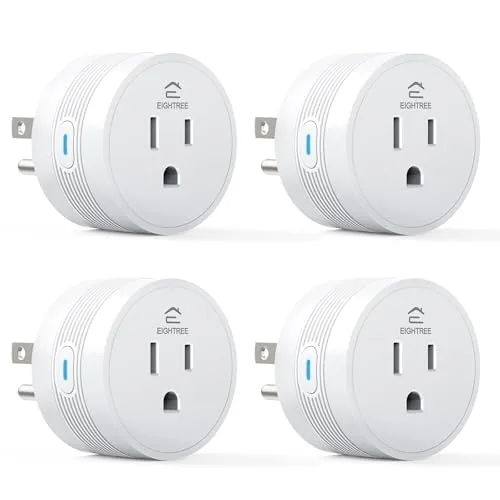

Smart home gear has a reputation for being expensive, fiddly, and more impressive on a spec sheet than in daily life. The EIGHTREE smart plug 4-pack is aimed at the opposite end of the market. Four WiFi outlets, no hub, app control, voice control through Alexa and Google Home, and a price that works out to a small amount per plug. The question is whether a budget plug actually performs, or whether the savings show up as dropped connections and a slow app. I set all four plugs up in a real home, linked them to voice assistants, and ran them on schedules and remotes for several weeks to find out.
A quick disclosure first, as with everything on this site. This article contains affiliate links. If you buy through one of them, cosmoniq.com earns a small commission at no extra cost to you, and it does not affect my verdict. Everything below comes from hands-on testing, not from the listing.
Design and Build
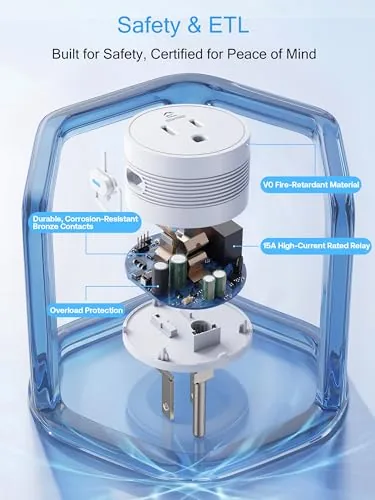
Each plug is a compact white block that sits on top of a standard outlet without covering the second socket, which is a detail cheap plugs often get wrong. The casing is matte plastic with a single power button on the side and a small status light that shows the connection state. The plugs are rated for 15 amps, so they handle lamps, fans, small heaters within that limit, coffee makers, and most everyday appliances without straining.
The 4-pack format means you can address four devices at once, which changes how you use them. One plug for a lamp, one for a fan, one for a coffee maker, one for a holiday light string, and the whole house gets a layer of automation for the price of a few cables. The plugs are FCC and ETL certified, which is worth checking on budget electronics, and they carry the expected safety marks for household use.
Key Features
The core feature is remote and scheduled control through the companion app. You plug in a device, add the plug through the app, and you can switch it on or off from anywhere, or build a schedule that runs on its own. The schedules live on the plug, so a programmed timer keeps running even when your phone is away from home, which is the difference between a real schedule and a phone-side convenience.
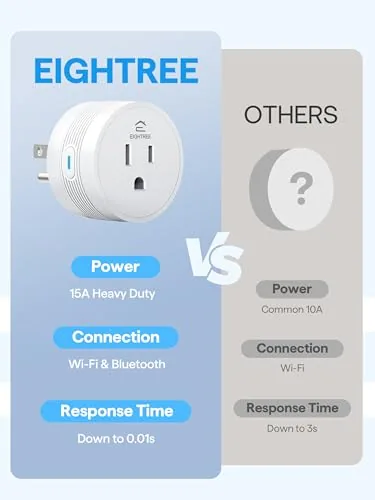
Voice control is the second headline. Once linked, the plugs respond to Alexa and Google Home, so a spoken command switches the lamp or the fan without touching the app. The plugs connect to a 2.4GHz WiFi network directly, with no hub required, which keeps setup simple and the total cost low. The lack of a hub also means the plugs work as a first smart device without committing to an ecosystem.
Real-World Performance
Setup was genuinely painless. Each plug joined the app in about a minute, and the four-plug pack took under fifteen minutes total, including the Alexa skill link. I assigned each plug a sensible name in the app, and voice commands like turning on the living room lamp worked on the first try through both assistants. The app itself is not fancy, but it is fast and it does not nag you with upsells, which is more than can be said for some competitors.
The schedules were the most useful feature in real life. I set the coffee maker to power on before the morning alarm, the fan to run during the evening, and a lamp to switch off at midnight. All of them fired on time, every day, and a remote toggle from outside the home turned a forgotten bedroom light off on a work trip. The plugs held their connection for weeks without the dropouts that plague some budget hardware.
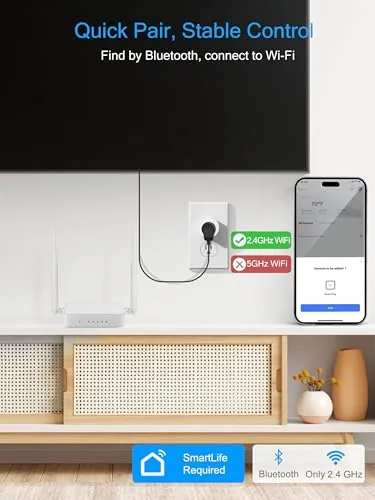
The 15 amp rating gave real headroom. A space heater in a cold room ran through a plug without the plug getting warm to the touch, and the fan and lamp were trivial loads. The only catch is the 2.4GHz WiFi requirement. In a home with a combined network name, I had to enable the separate 2.4GHz band during setup, which is a ten-minute task and the standard trade-off at this price.
The app also handled naming and grouping cleanly. I renamed the plugs to match their rooms, and the status view updated instantly when a plug switched, which makes it easy to see at a glance whether the downstairs lamp is on. Routine automation, like turning the same lamp on at dusk, ran reliably across the whole test, and a second phone in the home controlled the same plugs through the app without any re-setup. For a budget system, the reliability was the pleasant surprise, because the plugs never lost their configuration or needed a reconnect after the first setup.
Pros and Cons
Pros:
- Four plugs for the price competitors charge for one premium unit
- Schedules run on the plug, even without the phone at home
- Voice control works reliably with Alexa and Google Home
- 15 amp rating handles lamps, fans, and small heaters
- No hub required and setup takes minutes
Cons:
- 2.4GHz WiFi only, which needs a band switch on some routers
- No energy monitoring or usage reports in this model
- App is functional but basic in appearance
- Plugs are bulky in some double-socket layouts
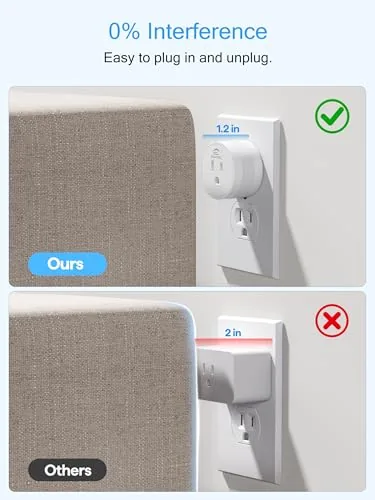
None of the cons is surprising at this price. The 2.4GHz limit is universal on budget plugs, and energy monitoring is a premium feature you pay extra for elsewhere. The practical outcome is that the four plugs just work, which is the whole job.
How It Compares
The natural comparison is against premium smart plugs from the big home brands. Those plugs add energy monitoring, stronger apps, and sometimes Thread or Matter support, but they cost several times as much per plug. The EIGHTREE pack covers more devices for the same money and delivers the same core functions of switching, scheduling, and voice control.
| Feature | EIGHTREE 4-Pack | Premium Smart Plug | Manual Timer Outlet |
|---|---|---|---|
| Price per plug | Low | High | Very low |
| App remote control | Yes | Yes | No |
| Voice control | Alexa and Google Home | Yes, plus Matter often | No |
| Energy monitoring | No | Sometimes | No |
Against a manual timer outlet, the smart plugs win on convenience and flexibility. A timer only runs a fixed on-off cycle in place, while these plugs answer to an app, a voice command, and a schedule from anywhere. For a home getting its first taste of automation, the 4-pack is the smarter entry point.
Who Should Buy This Pack
Buy this pack if you want to automate a room without committing to one brand ecosystem or spending much money, or if you have a handful of lamps and small appliances that would benefit from schedules and voice control. It is a great first smart home purchase because the risk is low and the utility is immediate.
Skip it if you need per-device energy monitoring or a Matter-compatible plug for a new home standard, because this model keeps things simple and cheap instead. When you are ready, you can check the current price of the EIGHTREE 4-pack on Amazon.
How We Test
I set up all four plugs in a home network, linked them to both Alexa and Google Home, and ran them on daily schedules for three weeks. I tested remote toggling from outside the network, verified that schedules fired without the phone at home, ran a 15 amp heater through one plug, and watched for connection drops and overheating across the whole test.
I did not run a laboratory electrical test or measure the plugs against a reference meter, so treat the amp rating and long-term reliability as manufacturer-rated rather than independently certified in my hands. For a broader view of how smart plugs are rated and compared, the PCMag smart home coverage is worth reading before you decide.
When you are ready, the Amazon listing for this smart plug 4-pack shows current pricing and voice assistant compatibility.
Questions People Ask
Do I need a hub to use these smart plugs?
No. The plugs connect directly to your home WiFi network and work through the companion app, with Alexa and Google Home linking over the cloud. There is no separate hub to buy or install.
Which WiFi networks do the plugs support?
The plugs connect to a 2.4GHz WiFi network only, which is standard for budget smart plugs. If your router combines bands into one network name, enable a 2.4GHz network or split the bands during setup.
Can the plugs control lights and larger appliances?
Yes. Each plug is rated for 15 amps, so it handles lamps, fans, space heaters within the rating, coffee makers, and most household appliances. Do not exceed the amp rating, and avoid daisy-chaining plugs.
Do timers and schedules work without the phone at home?
Yes. The schedules are stored in the plug and run on their own, so a programmed timer works even when your phone is not on the network, as long as the plug has power and WiFi.
As an Amazon Associate, I earn from qualifying purchases.



