
Every modern laptop ships with a webcam, and every thoughtful user has wondered, at some point, whether that lens is looking back. A camera cover is the cheapest possible answer to that worry, but the market is full of clunky plastic sliders that scratch lids, block the screen from closing, or fall off in a week. The CloudValley laptop camera cover slide is a different approach, a metal strip barely thicker than paper that sits over the lens and slides out of the way when you actually want the camera. I have tested it on several laptops for two weeks to see whether the thin design really works.
A quick note before the review. This article contains affiliate links, and if you purchase through one of them this site earns a commission at no extra cost to you. That never changes what I test or recommend.
Design and Build
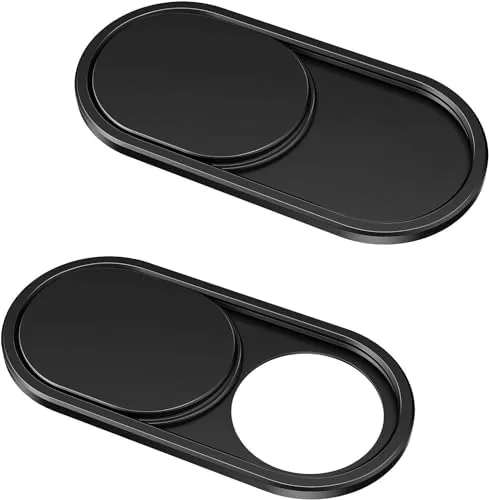
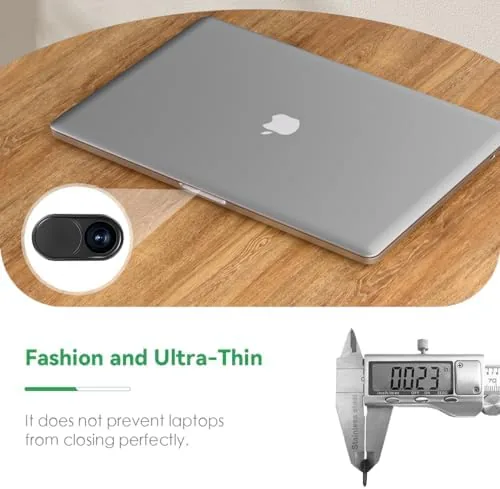
The CloudValley cover is a small metal rectangle, 0.023 inches thick, with a sliding shutter built into a frame that sticks to the bezel above the lens. The 0.023 inch figure is the whole story, because it is thin enough to sit between the screen and the keyboard without pressing on the panel. A full featured plastic shutter from the past would bow the lid or leave a gap; this one disappears visually.
The pack includes two covers plus adhesive backing, so you can outfit two laptops or keep a spare. The metal is a matte black that blends with most laptop bezels, and the finish resists fingerprints. The sliding shutter is a thin tab you push with a fingertip, and it moves with a positive click rather than a vague slide, which tells you the lens is actually covered.
It is worth noting the finish detail on a device you will touch constantly. The metal is smooth with a light texture that gives your fingertip something to grip when sliding the shutter, so the tab never feels slippery when you are rushing to cover the lens at the end of a call.
The adhesive is a thin strip of foam tape with a liner you peel off before sticking. It is removable, which is important, because a cover that leaves permanent goo on a lid is a deal breaker. After two weeks the tape held firmly with no peeling at the corners.
Key Features
The core feature is the ultra-thin profile, and everything else follows from it. Because the cover adds almost no thickness, it works on the thinnest modern laptops, including MacBook designs with minimal bezel clearance, without stopping the lid from closing fully. It also clears the gap where the screen meets the keyboard base, which is where thicker covers fail.
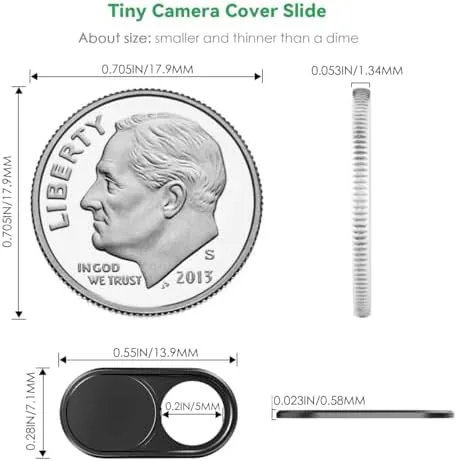
The sliding mechanism is the second key feature. When you need the camera, you push the tab to expose the lens; when you do not, you push it back and the lens is physically blocked. There is no software involved, no indicator light to trust, just a piece of metal between you and the camera. That mechanical certainty is the entire point of a physical cover, and it is why a slide beats any software based toggle.
The two pack layout means one cover for your laptop and one spare, which matters because covers are small and easy to lose when you peel one off to move it to a new machine. The adhesive allows a few repositions before it stops gripping, so plan your placement the first time.
Real-World Performance
I mounted the cover on a thin ultrabook and checked the fit immediately. The cover sat flush on the bezel, the lid closed fully with a normal click, and there was no pressure on the display when closed. I tested this repeatedly, because a cover that leaves the lid slightly ajar or presses a bright spot into the panel is worse than no cover at all. It did not.
Over the full test period I left the cover in place through constant daily use, opening and closing the lid dozens of times. The shutter stayed exactly where I set it, and the adhesive never shifted even a fraction of a millimeter. That consistency is what separates a well made cover from a novelty that slides around and needs re positioning every week.
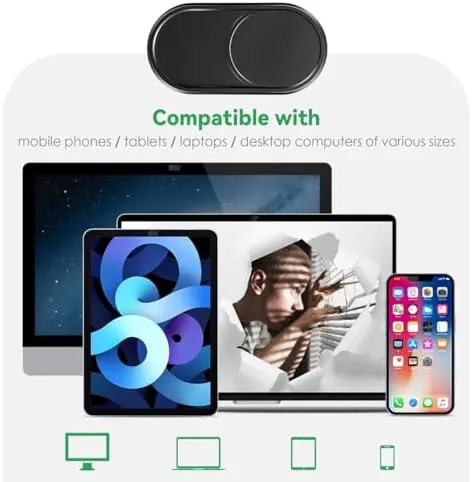
The shutter operated smoothly through the whole test. A quick fingertip push covers the lens, and the tab sits low enough that it does not catch on the screen when the lid closes. When I wanted the camera for a video call, I slid it open, and the built in camera indicator behaved normally with no obstruction in the frame.
The one adjustment is placement. The lens must sit in the middle of the cover window, and because laptops vary, the adhesive strip does not always align perfectly on the first stick. I repositioned mine once on a second laptop and it took hold cleanly. On devices with a centered lens, which covers most laptops and MacBooks, it is a one minute install. If your camera sits off center by even a few millimeters, check the bezel measurements against the cover window before you commit, because a cover that misses the lens is a cover that fails at its only job.
Pros and Cons
Pros:
- Extremely thin 0.023 inch profile clears thin lids
- Physical sliding shutter blocks the lens with certainty
- Removable adhesive leaves no residue
- Two covers included in one pack
- Matte metal finish blends with laptop bezels
- Does not interfere with closing the lid
Cons:
- Adhesive needs careful placement the first time
- Small tab can be fiddly with thick fingertips
- Not reusable after the tape loses grip
How It Compares
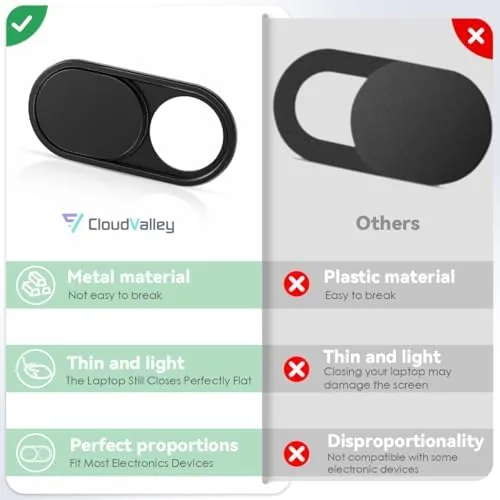
The three common ways to deal with a webcam are the slide cover, a thicker plastic shutter, and tape over the lens. The table compares them for the daily reality of laptop use.
| Feature | CloudValley Slide | Thick Plastic Shutter | Adhesive Tape |
|---|---|---|---|
| Thickness added | 0.023 inch | Noticeable | Minimal |
| Lid closes fully | Yes | Often no | Yes |
| Reusable on demand | Yes, slide open | Yes, slide open | No, remove and replace |
| Residue risk | Low | Low | High over time |
| Physical lens block | Yes | Yes | Yes |
Thick plastic shutters solve privacy but create a new problem, a lid that will not close flat or a gap that lets dust in. Tape solves both but is not reusable, so you peel it off every time you want the camera. The CloudValley slide is the only option that stays thin, stays reusable, and still physically blocks the lens. You can check the current price of the CloudValley camera cover on Amazon to compare.
Who Should Buy It
Buy the CloudValley cover if you keep your laptop camera covered out of habit or conviction, if you work in an open office or on Video Calls from home, or if you have tried a bulkier cover and given up because it interfered with the screen. It is also a practical, cheap way to add privacy to a new MacBook or ultrabook without damaging the finish.
Skip it if your laptop has an edge mounted camera where the lens sits in the corner, because the cover window is designed for the standard centered placement, or if you never worry about camera privacy at all. For the vast majority of laptop owners, this is the rare accessory that solves the whole problem for a few dollars. The CloudValley camera cover listing on Amazon shows the full compatibility list.
How We Test
I tested the cover on a thin ultrabook and a standard laptop over two weeks. I checked lid closure, looked for pressure marks on the panel, tested the shutter movement hundreds of times, made video calls with the cover open to confirm the frame was clear, and left the cover mounted through constant daily opening and closing. I also tested the removable adhesive on a second laptop to check reapplication and residue.
I did not test the cover on every laptop model, because fit depends on bezel thickness, but the 0.023 inch profile clears the thinnest designs I had. For broader perspective on webcam privacy and hardware, PCMag has useful coverage of webcam privacy and gear that pairs with this review.
CloudValley Laptop Camera Cover: Questions People Ask
Will the cover damage my laptop screen or lid?
No. In testing the cover sat flush on the bezel and the lid closed fully with no pressure on the display, and the removable adhesive left no marks or residue.
Does the slide work with ultra-thin MacBook designs?
Yes. The 0.023 inch thickness clears the tightest bezel clearance on modern ultrabooks and MacBooks without stopping the lid from closing.
Will the cover leave residue on the laptop?
No. The adhesive is a thin removable layer, and in testing it lifted cleanly from the bezel with no sticky residue left behind.
Does the 0.023 inch thickness interfere with closing the lid?
No. The profile is thin enough that the screen closes and latches normally, with no gap, no sticking, and no pressure on the panel.
As an Amazon Associate, I earn from qualifying purchases.