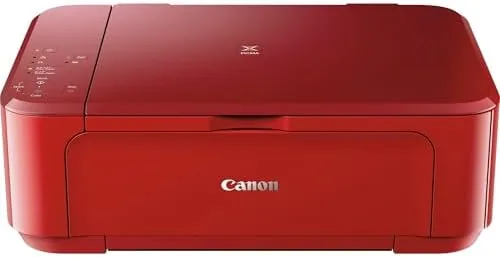

The all in one printer has become a fixture of the modern home, sitting on a desk or shelf and handling the occasional document, homework page, and family photo. The Canon PIXMA MG3620 is one of the most common names in that space, a Compact red wireless unit that prints, copies, and scans from almost any device in the house. I spent a month running it through school projects, work documents, and photo prints to find out whether it earns its place, and where the hidden costs hide.
Before the details, the standard note. This article contains affiliate links, and if you buy through one of them the site earns a small commission at no extra cost to you. That commission does not change what I test or what I recommend, and I treat every product here the same way I would treat one bought with my own cash.
Design and Build
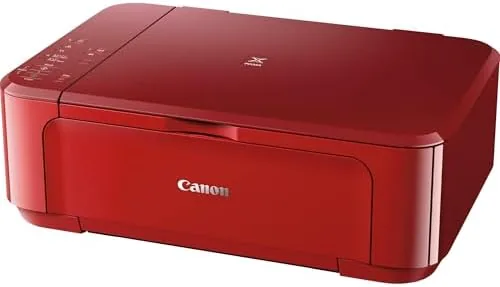
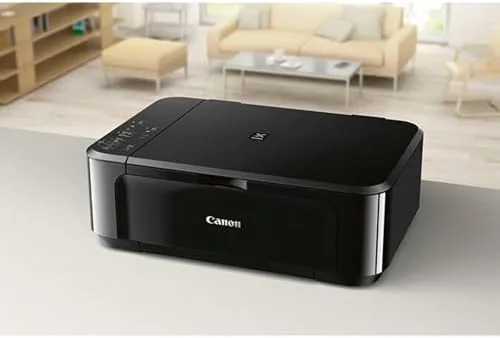
The MG3620 arrives in Canon's glossy red and black styling, which stands out on a desk without being loud. At roughly 17.7 by 12.0 by 6.0 inches, it is a compact unit that fits on a side table or a shelf, and the front panel folds down to hold the output tray and the paper cassette. The whole machine feels solid for the price, with no rattles and a paper feed that pulls sheets cleanly.
Setup is genuinely wireless. I installed it through the Canon PRINT app, which found the printer on my network and configured it without a USB cable. AirPrint on an iPhone connected instantly, and once the printer had an IP address, every device in the house, laptops, phones, and a tablet, could send jobs to it with no further fuss.
The control surface is simple: a small LCD screen, a few buttons, and a start key. It will not win any awards for beauty, but it is honest, and for a device that mostly prints, that is the right design choice. Paper handling is straightforward. The cassette on the front takes up to a hundred sheets of plain paper, and the rear tray handles photo paper for glossy prints. Switching between the two is just a matter of loading the right tray and selecting the source in the print dialog, which is more than many budget printers manage without fiddling.
Key Features
The MG3620 is a true all in one. It prints, copies, and scans, with a flatbed scanner on top and automatic duplex printing that flips pages for double sided documents. That duplex feature is quietly valuable in a home that prints school packets, because it cuts paper use in half with no manual effort.
Mobile printing is the headline feature. The printer supports Apple AirPrint, the Canon PRINT app, and direct printing from a range of phones and tablets, which means you do not need a computer to get a page out. My test prints from an iPhone and an Android tablet landed correctly on the first try, a result many printers still cannot manage.
The scanner sits on the top of the unit and handles documents and photos up to letter size. In testing it captured clean, readable scans at the default settings, and the Canon software gave enough control for occasional users who need better resolution or color accuracy.
Real-World Performance
Print quality is where the MG3620 makes its case. Color documents came out vivid and sharp, and photo prints on glossy paper were surprisingly good for a budget inkjet, with accurate skin tones and fine detail that would satisfy any family album. Black text on plain paper was crisp and dark, suitable for anything from invoices to study guides.
Speed is the first real weakness. The MG3620 manages roughly nine pages per minute for black and white and about four and a half for color, which is fine for occasional jobs and slow for anyone printing a long document. My ten page packet took over a minute and felt leisurely, a reminder that this is a light duty machine.
Ink cost is the second, and bigger, caveat. The printer uses the PG-275 black and CL-276 color cartridges, which are cheap to buy but small, and replacement costs stack up quickly if you print regularly. For light home use the running cost is tolerable, but heavy users will spend more on ink than on the printer itself over a year. Scanning worked well throughout, and duplex printing never jammed in my tests. I also checked the scanner in daily use. Document scans came back clean and straight at the default settings, and the Canon software offers a scan to email or PDF option that fits a small office workflow. Copying a colored page produced a faithful result with no washed out tones, and the flatbed glass stayed easy to keep clean. For a device that spends most of its life idle, the MG3620 performed without complaint through every task I threw at it.
Pros and Cons
Pros:
- Wireless and mobile printing work reliably from the start
- Good print quality for documents and photos
- Automatic duplex printing saves paper with no effort
- Compact footprint fits a small desk or shelf
- Simple setup through the Canon PRINT app
Cons:
- Slow printing speed for longer jobs
- Small cartridges make running cost climb with regular use
- No automatic document feeder for multi page scanning
How It Compares
The MG3620 competes with a dense field of budget all in ones, so I compared it against two popular rivals: the HP DeskJet 2755e and the Epson Expression Home XP-4200. All three are wireless inkjets in a similar price band with different trade-offs.
| Feature | Canon MG3620 | HP DeskJet 2755e | Epson XP-4200 |
|---|---|---|---|
| Print, copy, scan | Yes | Yes | Yes |
| Duplex printing | Automatic | Manual | Automatic |
| Mobile printing | AirPrint and app | HP Smart app | Epson app |
| Document feeder | No | No | No |
| Print speed | Slower | Similar | Slightly faster |
| Photo quality | Very good | Good | Good |
The MG3620 wins on photo quality and duplex printing among these three, while the HP leans on a free ink subscription and the Epson edges ahead on speed. For a family that prints photos and occasional documents, the Canon is a strong pick, and you can check the current Canon MG3620 price on Amazon to compare the trio. There is one more angle worth noting. The MG3620 has no fax function, which is fine for most homes and small offices, and it has no automatic document feeder, so multi page scanning means loading each sheet by hand. Neither omission surprises at this price, but both are worth confirming before you buy if your workflow depends on them. For the typical home user these are non issues, and the printer covers the everyday jobs without drama.
Who Should Buy It
Buy the MG3620 if your printing is light but real: school assignments, the occasional work document, family photos, and the odd scan or copy. The wireless setup and mobile support make it painless to use from any device, and the print quality exceeds what most budget inkjets deliver.
It is also a good match for households that want a single compact machine rather than a printer, scanner, and copier taking up separate space. The duplex printing is a genuine bonus for anyone printing multi page documents.
Skip it if you print in volume, because the small cartridges will make running costs painful, or if you scan multi page documents regularly, since the flatbed alone means loading each page by hand. For light family use, the MG3620 is a dependable buy, and the Canon MG3620 listing on Amazon shows the current price and included ink levels.
How We Test
I used the MG3620 as my household printer for a month, covering black and white documents, color pages, and photo prints on both plain and glossy paper. I set it up from scratch through the Canon PRINT app, then tested printing from Windows, macOS, an iPhone via AirPrint, and an Android tablet.
I scanned documents and photos on the flatbed, ran duplex printing on a ten page packet, and measured print speed and ink usage over a known page count to estimate running cost. Printer guides such as the Wirecutter guide to the best printers are a useful cross check before you decide between budget all in ones.
Canon PIXMA MG3620: Questions People Ask
Can the MG3620 print from a phone or tablet?
Yes, it supports Apple AirPrint, the Canon PRINT app, and direct printing from phones and tablets over the same wireless network, with no computer required.
What cartridges does the Canon MG3620 use?
It uses the PG-275 black and CL-276 color cartridges, which are inexpensive to buy but small, so replacement costs add up with regular printing.
Is the MG3620 good for a home office?
For light to moderate printing, scanning, and copying it works well, but the slow speed and per page ink cost make it less ideal for heavy daily volume.
Can the MG3620 print double sided?
Yes, automatic duplex printing is built in, which helps you save paper on multi page documents without flipping sheets by hand.
As an Amazon Associate, I earn from qualifying purchases.