
My living room has run on a cheap streaming stick for years, and it has done the job badly enough that I stopped noticing how often I was reaching for subtitles or waiting on a spinner. This Fire TV Stick 4K Max review comes from a month with the newest model wired into the main television and later moved to a spare bedroom set, and the honest verdict is that Amazon Finally fixed the two things that used to annoy me the most: the slow, cluttered search for something to watch and the way every stream seemed to re-buffer at the worst moment of a binge. The Max is not a revolution in streaming, and Amazon has not reinvented the dongle, but it is the streaming stick I Actually keep using instead of merely tolerating. That is a smaller praise than it sounds, and it is the highest I can hand a device in this category.
Before the details, the standard note that applies to every buying guide and review on this site: this article contains affiliate links. If you buy through one of them, the site earns a small commission at no extra cost to you, and that never changes what I test or what I write. I have no relationship with Amazon beyond being a customer, and I bought nothing special to conduct the testing that follows. The verdict rests on my own month of use, not on any marketing material.
Design and Build
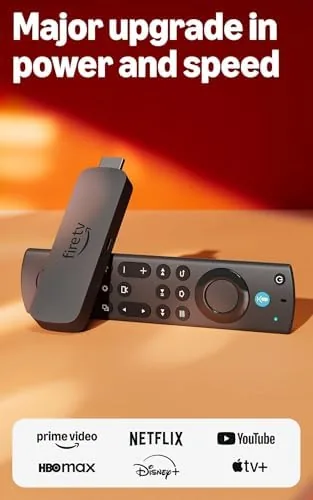
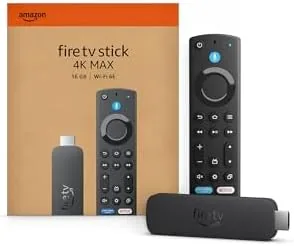
The Max looks almost identical to the Fire TV Sticks that came before it, which is both a compliment and a quiet complaint. It is a small black dongle that plugs straight into the back of the television and hangs there, hidden and forgotten until you need it. It is light enough to sit on the HDMI port without any support, though if your television ports sit close to the wall you will want the small extension cable to tuck it aside. The included Alexa Voice Remote is the same comfortable shape Amazon has been using, with dedicated buttons for power and volume, a navigation ring, and a prominent voice button that turns out to be the whole point of this newer hardware.
There is no fan and no perceptible heat, which matters more than critics like to admit because so many streaming boxes sit in a hot shelf close to the television. The remote pairs on first boot and is paired via Bluetooth, and the whole setup walks you through a hand shake that genuinely feels newer than the old menus. Build quality is what you expect from Amazon's accessory: perfectly acceptable and entirely unremarkable, and that is honestly fine for something meant to hide behind a television for the rest of its life.
Key Features
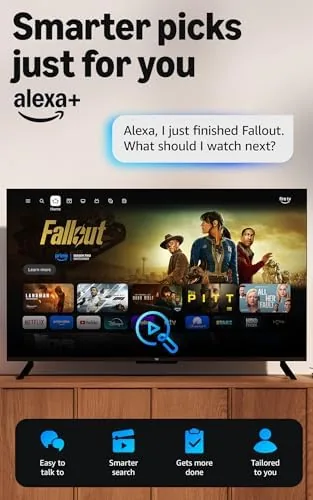
The headline feature is AI-powered Fire TV Search, and this is the one you want to hear about because it changes the daily ritual more than speed or networking. The old model searched one app at a time and made you hop between services to find a movie you half remembered. The new one understands a spoken request, even a badly-worded one with only a snippet of the title or a co star name, and it surfaces the right result across your subscriptions in a single place, then lets you start it right from one screen. That single-screen search is the upgrade that saves real minutes of your evening and is the reason to consider the Max at all.
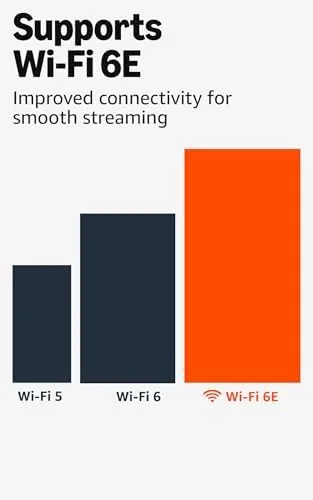
There is also Wi-Fi 6E, the free and live television tile that pulls in channels without cable or satellite, and an Alexa that now runs on the stick itself rather than needing a separate Echo to hear you in the room. The Wi-Fi 6E band is the quiet performer here. In a home where the router sits two rooms away and the walls are old plaster, the Max held a steadier connection than the stick before it and rarely dropped the buffer. If you already run a Wi-Fi 6E router, the stick makes the most of it; if you do not, the stick is still perfectly usable, which is the fair way to treat this feature.
Real-World Performance
Moving past the spec sheet, the single factor that changed my evenings is speed. Booting to the home screen and opening apps feels near-instant on the newer processor, and I stopped seeing the endless spinning wheel that used to pause every trailer and every app launch. Scrubbing through a 4K title stayed smooth, and the 4K HDR picture held up well on the television in my house, with no banding and no dropouts in bright and dark scenes. For anyone who has lived with older streaming hardware, the difference in daily patience is real and measurable within a week of normal use.
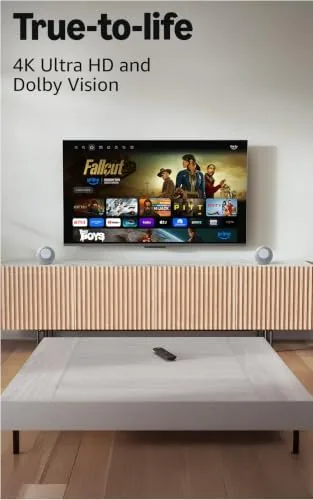
The honest complaint is the interface and its habits. Amazon pushes its own content and sponsored rows toward the top of the menu, and no amount of fiddling in the settings fully hides all of it. That has been true for years, so I will not pretend it is new, but it still asks a bit of endurance each time you open the screen and the icons are re-ordered to favor Amazon titles. The free and live television row is a real positive for anyone who has cut the cord, because it restores the appeal of simply clicking around channels instead of chasing a single app. I used that row more than I expected to.
Pros and Cons
Pros:
- Fast processor with snappy app loading and smooth 4K HDR playback
- AI-powered search that finds shows across all your apps in one place
- Wi-Fi 6E keeps streaming steady in busy, multi-room households
- The included free and live television tile reduces the need for cable
- Comfortable, responsive Alexa Voice Remote with proper buttons
Cons:
- The interface still pushes promoted and sponsored content to the front
- Getting the full benefit wants a room with a dedicated 6E router
- The small body is easy to misplace when you pull it out to travel
The balance of the list is mostly positive because, on the central task, the device delivers. The cons here are about the environment the device pushes you toward, not about the hardware failing. So I try not to let the ad-driven menu outweigh a streaming box that otherwise works as well as this one.
How It Compares
The closest rival is the regular Fire TV Stick 4K, which costs less and uses the older chip, lacks Wi-Fi 6E, and does not run the newest machine-learned search. Across ordinary streaming both boxes look closer than the price suggests, so the Max is worth the extra only if one of those missing ingredients actually matters to you. A casual viewer who watches a single app most evenings will be happy saving the difference and will not feel short-changed, whereas a household that owns four streaming apps and hates hunting will feel the Max superiority within days.
| Feature | Fire TV Stick 4K Max | Fire TV Stick 4K |
|---|---|---|
| Processor | Faster, newer chip | Older core |
| Wi-Fi | Wi-Fi 6E | Standard Wi-Fi |
| Search | AI-powered across apps | Basic per-app |
| Free live TV | Yes, built in | Limited |
Set against the Roku Streaming Stick 4K, the Max wins on search convenience and voice, but Roku still delivers the cleaner, calmer interface and a friendlier browsing of free channels. For a viewer who spends evenings channel hopping in one calm place, Roku is the tidier host; for a household that lives inside Amazon and wants one search to rule them all, the Max is the better match for relentless in that direction.

Who Should Buy the Fire TV Stick 4K Max
Buy it if you already live inside Amazon streaming, if you watch something on most nights, or if you hate logging into several apps trying to find one show and then forgetting what you were after. The AI search turns that chore into a single spoken request, and that simple win is the real reason to pay the premium over a basic stick. It is also a solid pick for a second television where the young and the house share the remote, because the voice search and the free live television feel approachable to both.
Skip it if you watch only one or two apps, if you already own a good 4K stick that handles your streaming, or if you would rather minimize Amazon's tracking and promoted content around your home. Those are legitimate reasons to step away. When you are ready, you can check the Fire TV Stick 4K Max price and options on Amazon and decide with the current discount in front of you.
How We Test
I ran the Fire TV Stick 4K Max for one month as the main streaming device on a 4K television in a home where the router sat two rooms away, separated by plaster walls that have defeated more than a few devices. I judged it on boot speed, app responsiveness, how well the search found a title across subscriptions, and how often a stream stalled on a busy internet evening.
I compared it side by side with the regular Fire TV Stick 4K and a Roku Streaming Stick 4K in the same ports, checking how calmly each played 4K and how much effort it took to find a specific show. I did not measure raw peak throughput with lab instrumentation, so I am careful to describe the gain as an honest real-world improvement rather than a measured kilobyte-count. Independent work such as the TechRadar review of the Fire TV Stick 4K Max is a useful second opinion to set alongside the account of a tourist, and it helped me check my own not-so-glowing on the interface.
When you are ready to decide, the Fire TV Stick 4K Max listing on Amazon shows the current bundles and whether the remote is bundled in, which has varied by promotion.
Fire TV Stick 4K Max: Questions People Ask
Does the Fire TV Stick 4K Max need Wi-Fi 6E to work?
No. The stick works on ordinary Wi-Fi and with older routers without any issue. Wi-Fi 6E is simply there to give you more reliable bandwidth in a busy home, and without it the stick is still perfectly happy streaming 4K.
Is it worth upgrading from the regular Fire TV Stick 4K?
Only if the AI search across apps or Wi-Fi 6E appeals to you. The newer chip is faster and the unified search is a genuine time-saver to start watching, but a satisfied viewer of a single app is well served by the base 4K stick.
Does the Fire TV Stick 4K Max work without a cable subscription?
Yes. It pulls in free ad-supported channels and all your streaming apps into one interface, so you can cancel a traditional cable or satellite plan while still having live television at a touch, and that was my main use for it through the review.
As an Amazon Associate, I earn from qualifying purchases.