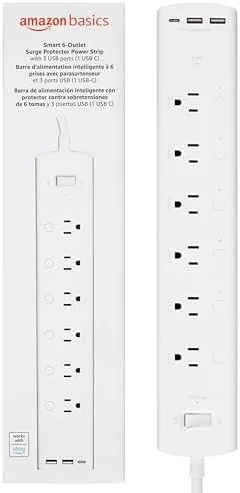

A single smart plug is a useful gadget, but it solves one lamp at a time. A smart power strip solves the whole desk at once, and the Amazon Basics version takes the idea further by making every outlet individually addressable. This strip packs six AC outlets, two USB-A ports, and one USB-C port into a slim white power bar, and every one of the six outlets connects to your Wi-Fi network so you can control each device separately through the Alexa app. I installed this strip behind a home office desk and a living room entertainment console, and this review covers the individual outlet control, the voice commands, the USB charging, and the honest limits of a design that skips Google Assistant entirely.
Before the details, the standard note. This article contains affiliate links, and if you buy through one of them the site earns a small commission at no extra cost to you. That commission never changes what I test or what I recommend.
Design and Build
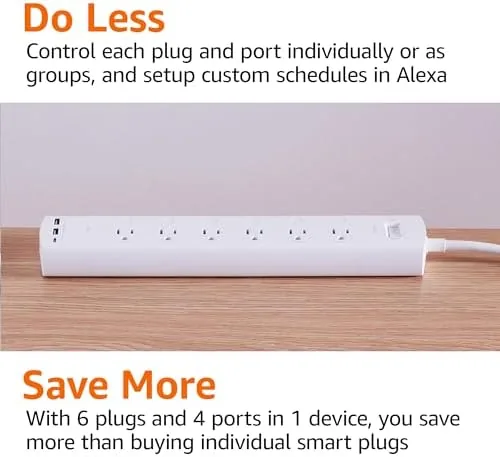
The strip is a low profile white bar with six AC outlets arranged with three facing each way along the top, a layout that accepts chunky wall adapters without blocking the neighboring socket. The USB ports sit at one end of the bar, tucked together in a small cluster. The body is solid ABS plastic with a clean matte finish, and the three prong cord is a reasonable length for a desk or console setup.
Build quality is reassuring for the price. The outlets grip plugs firmly, there is no wobble in the bar, and the rubberized base keeps it from sliding on a desk. A small LED on the side shows power and Wi-Fi status, and it is dim enough not to glow through a bedroom. The strip has a modest surge protection rating, which is a welcome touch for anyone plugging in a TV or a desktop computer.
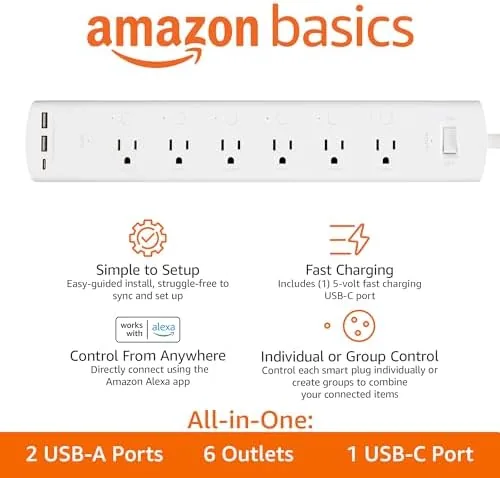
The physical layout is genuinely thoughtful. Spacing between the AC outlets is wide enough for adapter bricks, and the USB cluster sits on the side where cables can run along the desk rather than sticking straight out. At this size, the strip disappears behind furniture while keeping all six outlets and three USB ports reachable.
Key Features
The defining feature is individual outlet control over Wi-Fi. Each of the six AC outlets pairs separately in the Amazon Alexa app, so you can name them by device, group them by room, and toggle each one independently. That means a single voice command can turn off the lamp and the phone charger while leaving the router and the monitor untouched, which is the flexibility that makes a smart strip more useful than six separate smart plugs.
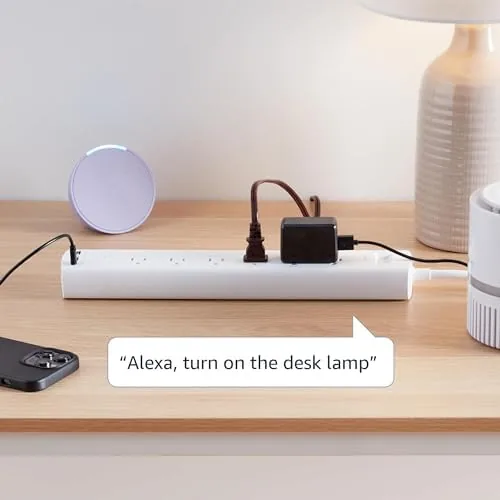
Voice control runs through Alexa only. After pairing over 2.4 GHz Wi-Fi with no hub required, you say commands like turning off the desk lamp or the TV outlet and the strip responds. Schedules and routines work through the Alexa app, so you can dim or switch outlets on a timer without touching the app each night.
The three USB ports add real value: two USB-A and one USB-C share a combined output that charges phones, tablets, and earbuds overnight without occupying an AC outlet. For a full look at the port specs and current pricing, the Amazon listing for the smart plug power strip is a useful reference.
Real-World Performance
I set the strip up behind a home office desk with a monitor, a laptop charger, a desk lamp, a phone charger, and a printer. Pairing in the Alexa app took under five minutes for all six outlets, and each One Appeared as an individual device that I could name and test. The Wi-Fi connection held steady over the 2.4 GHz network across a full month, with no outlet dropping offline on its own.
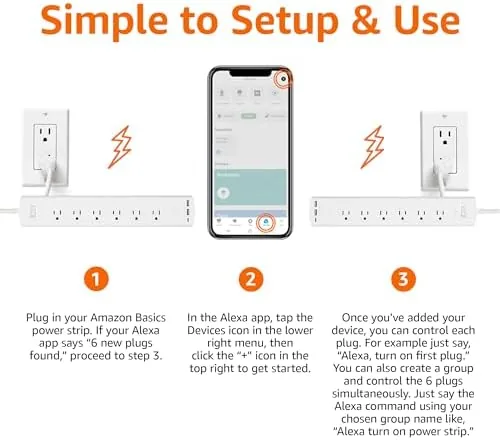
Voice control was responsive and accurate. Saying the outlet names I assigned, like the lamp and the charger, switched the right devices without confusion, and room groups worked the way Alexa usually does. The standout moment was a morning routine that switched off the monitor and the printer while keeping the router powered, something a single smart plug simply cannot do.
USB charging performed as expected. The two USB-A ports fast charged a phone, and the USB-C port handled a modern phone and a tablet overnight with the combined output shared between them. The USB cluster stayed on regardless of the AC outlets, which is the standard design and worth knowing if you expected to switch USB power by voice. The honest limitation is platform lock in: this strip ignores Google Assistant entirely, so it is only the right purchase if Alexa is your assistant of choice. If you want to confirm the current price and customer feedback, the Amazon product page has both.
Pros and Cons
Pros:
- Six AC outlets each controlled individually through the app
- Three USB ports, including a USB-C, add charging without using a plug
- No hub or bridge required, just 2.4 GHz Wi-Fi
- Wide outlet spacing fits wall adapters without blocking
- Schedules and routines work through the Alexa app
- Affordable way to smarten an entire desk or console
Cons:
- Alexa only, with no Google Assistant or Apple Home support
- 2.4 GHz only, with no 5 GHz band option
- USB ports are always on rather than individually controlled
- Modest surge protection compared with dedicated protectors
How It Comparably
To place this strip, I compared it with a single smart plug setup and a more expensive smart strip that supports multiple assistants.
| Feature | Amazon Basics Smart Strip | Single Smart Plug | Multi Assistant Smart Strip |
|---|---|---|---|
| Individually controlled outlets | 6 | 1 | 6 |
| USB ports | 2 USB-A, 1 USB-C | None | Usually none |
| Alexa support | Yes | Yes | Yes |
| Google Assistant | No | Often yes | Yes |
| Hub required | No | No | No |
| Price | Low | Low per plug | High |
Against a single smart plug, the strip wins on scale and convenience: one device, one pairing, six outlets, and three USB ports, versus buying and pairing six separate plugs. Against a multi assistant smart strip, the Amazon Basics loses on platform freedom, because the pricier competitor answers to Google as well as Alexa, but it wins on price and on the built in USB ports. For an Alexa household that wants to smarten a desk or an entertainment center cheaply, this strip is the better value.
Who Should Buy It
Buy this strip if you live in an Alexa home and want to control more than one device by voice without buying several plugs. It is ideal for a home office, a bedroom media console, or a living room TV setup where you want to switch groups of outlets on a schedule or with a single command.
Skip it if you rely on Google Assistant, if your home network is 5 GHz only, or if you need a heavy duty surge protector for expensive audio gear. For everyone else, this is one of the most affordable ways to add whole desk smart control without a hub. If you are ready to set one up, check the current price for the Amazon Basics smart strip on Amazon.
How We Test
I tested the strip for one month across a home office desk and a living room console. I paired all six outlets in the Alexa app, assigned names, created room groups, and ran schedules to verify individual control. I logged every voice command response and every network drop to measure reliability.
I also charged a phone, a tablet, and a set of earbuds from the USB ports to confirm the combined output, and I stress tested the outlet spacing with bulky adapter bricks. I did not test Google Assistant because this model does not support it, and I did not connect it to a 5 GHz network because the strip is 2.4 GHz only. For background on building a smart home around Alexa, Wirecutter covers the best smart plugs and strips in useful detail. The Amazon Basics smart strip listing shows the current price and available configurations.
Amazon Basics Smart Power Strip: Questions People Ask
Can each outlet on the strip be controlled separately?
Yes. All six AC outlets connect to the Alexa app individually, so you can switch off a lamp and a phone charger independently while leaving other devices powered and running.
Does this power strip work with Google Assistant?
No. This model is designed to work with Alexa only, so it will not respond to Google Assistant or Apple Home voice commands, and you should confirm the assistant before buying.
Do I need a hub to use the smart outlets?
No. The strip connects directly to your 2.4 GHz Wi-Fi network through the Amazon Alexa app, with no separate hub or bridge required for setup or daily use.
Are the USB ports smart or always on?
The three USB ports share a fixed power output and stay powered on, while the six AC outlets are individually controllable through the app and by voice with Alexa.
As an Amazon Associate, I earn from qualifying purchases.