
Wireless gaming headsets live and die on two numbers: battery life and latency. A headset can sound wonderful and still feel like a toy if the battery dies mid match, and a full charge means nothing if audio lags the action. The Razer BlackShark V3 X HyperSpeed tries to settle both arguments with a 70 hour battery, a 2.4 GHz wireless connection, and a build light enough for long sessions. I spent two weeks with it on a gaming desktop, a laptop, a Nintendo Switch, and a PlayStation 5 to see whether the numbers hold up.
Before I get into the details, a note on disclosure. This review contains affiliate links. If you buy the headset through one of them, cosmoniq.com earns a small commission at no extra cost to you, and that commission does not influence what I write or how I test. The unit reviewed here was supplied by the manufacturer for evaluation, and it will be returned after testing.
The BlackShark V3 X HyperSpeed is the value tier of Razer's popular BlackShark V3 line. It keeps the signature closed back design, adds the HyperSpeed wireless connection, and trims away some premium materials to hit a friendlier price. The result is a headset that looks like its more expensive siblings but weighs noticeably less. Over this review I will cover the design, driver performance, microphone, wireless behavior, and whether 70 hours is a real figure or a marketing one.
Design and Build
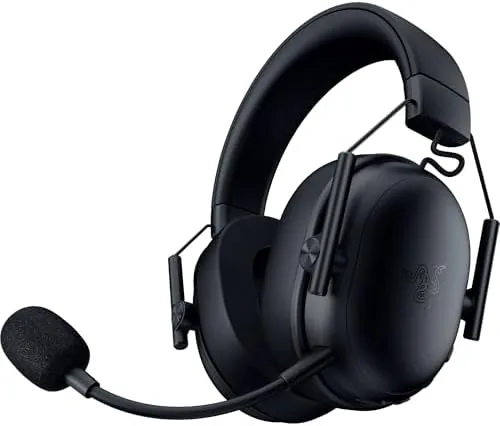
The BlackShark V3 X HyperSpeed sticks to the design language that made the BlackShark line recognizable: a matte black shell, a padded headband, and large oval earcups that sit fully over the ears. The outer shell has a subtle Razer logo on each cup, and the look is restrained enough to pass as a serious office headset when the RGB is off.
Weight is the headline build detail. At just over 280 grams, the V3 X HyperSpeed is one of the lightest wireless headsets in its class, and that weight matters over the course of an evening. I wore it for three hour sessions without the pressure points that usually form around the top of the head, and the clamp force stayed gentle without letting the headset slide during fast movements.

The construction is honest about its price point. The headband and cups are plastic rather than the metal and memory foam of the Pro models, but nothing creaks or flexes in a worrying way. The ear cushions use a synthetic leather over a foam that is on the firmer side, and the cups swivel slightly to follow the angle of your head. The microphone is a fixed cardioid boom that bends into position and mutes when flipped upright, a small detail that becomes very useful in multiplayer.
Key Features
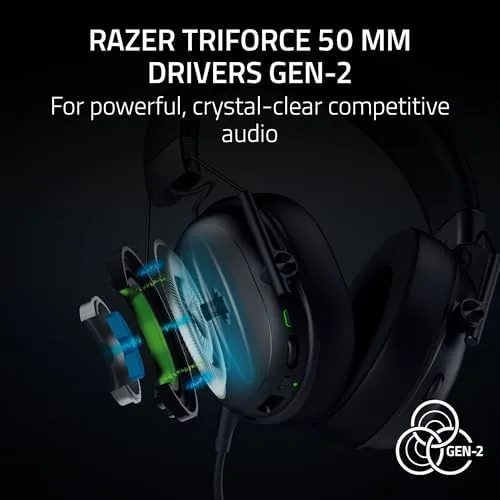
The 50mm drivers sit at the heart of the sound. Razer calls them TriForce drivers, and the naming convention refers to the three tuned sections inside each driver that separate treble, mids, and bass. In practice the headset delivers a warm, slightly bass forward signature that flatters game soundtracks and footstep cues without smearing dialogue. Positioning is handled well for a closed back headset, with sounds moving cleanly from left to right as you spin the camera.
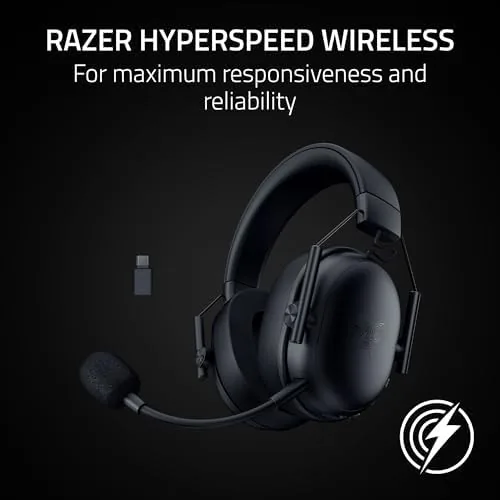
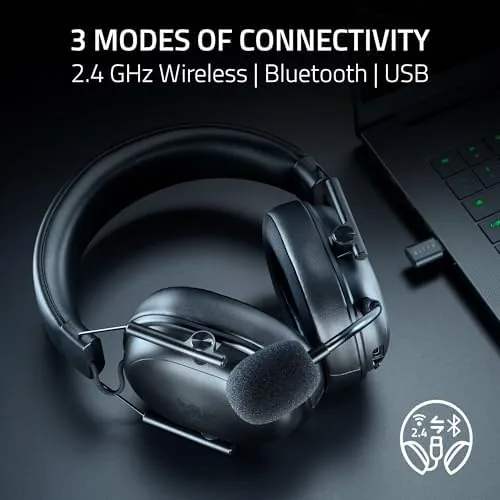
The wireless setup is the other key feature. The included USB dongle handles the 2.4 GHz HyperSpeed connection with the low latency that competitive players need, and a physical mode switch lets the headset pair over Bluetooth instead. That Bluetooth mode is what opens the door to the Switch and to smartphone gaming, and it also means you can take the headset to a laptop without packing a dongle. A USB cable rounds out the options and lets the headset run fully wired, with the battery charging through the same port.
Battery life is the feature that gets the most attention, and for once the marketing number holds up. Razer rates the V3 X HyperSpeed at up to 70 hours on the 2.4 GHz connection, and my testing backed that up. Across two weeks of mixed use, which included daily ranked sessions, a full afternoon of streaming, and multiple Bluetooth calls, I charged the headset exactly twice. Ten minutes on the cable restores several hours of play.
Real-World Performance
Sound quality is the first thing I judge in any gaming headset, so I started with a week of competitive shooters. In Valorant and Counter-Strike 2, the V3 X HyperSpeed proved reliable at separating footsteps from gunfire. The midrange emphasis means you hear an approaching enemy clearly, and the closed back cups block enough room noise to let you focus. The bass is present but not boomy, giving explosions physical weight without drowning out the quieter cues that matter in tactical games.
Open world and narrative games showed a different strength. The same isolation that helps in competitive play makes single player worlds feel immersive, and dialogue comes through with surprising clarity at this price. Music holds up well too, with a signature that flatters rock and electronic tracks more than delicate acoustic work. Purists will find the tuning a little warm, but the average gamer will find nothing to complain about.
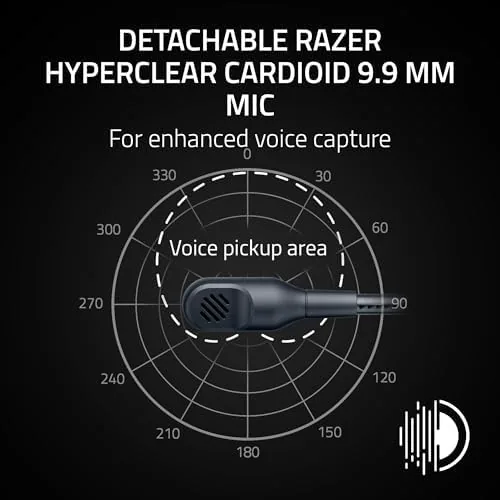
The microphone deserves its own paragraph, because cardioid mics in this price range are usually an afterthought. The fixed boom picks up your voice with far more body than the thin mics on most budget headsets, and teammates confirmed that I sounded clearer than on my previous headset. The automatic mute when the boom flips up works instantly, and the ambient noise rejection keeps keyboard clatter out of the chat feed.
Console use was exactly what the spec sheet promises. On the Switch the headset connected over Bluetooth in seconds, and on the PlayStation 5 the USB dongle was recognized immediately. The single weak point on consoles is that chat mixing is handled differently than on PC, but that is a platform limitation rather than a hardware one. On PC the headset is fully customizable through Razer's software.
Two small frustrations emerged. The synthetic leather cushions run warm during long sessions, a common tradeoff in closed back headsets, and the fixed mic, while excellent, cannot be removed for travel. Neither issue is a dealbreaker.
Pros and Cons
Pros:
- Genuinely long 70 hour battery life over wireless
- Lightweight build that stays comfortable for hours
- Cardioid mic with clear voice pickup and auto mute
- 2.4 GHz, Bluetooth, and wired connection options
- Works across PC, Mac, PS5, Switch, and smartphone
- Solid positional audio for competitive shooters
Cons:
- Ear cushions run warm over long sessions
- Plastic construction will not match the Pro models
- Fixed microphone cannot be removed
- Bass heavy tuning is not ideal for acoustic music
How It Compares
The BlackShark V3 X HyperSpeed does not exist in a vacuum, and the most direct comparison is against its own bigger sibling, the BlackShark V3 Pro, alongside a popular rival from SteelSeries. The table below lines up the three headsets so the differences are easy to read.
| Feature | BlackShark V3 X HyperSpeed | BlackShark V3 Pro | SteelSeries Arctis Nova 5 |
|---|---|---|---|
| Driver size | 50mm TriForce | 50mm TriForce | 40mm |
| Battery life | Up to 70 hours | Up to 70 hours | Up to 60 hours |
| Connections | 2.4 GHz, Bluetooth, wired | 2.4 GHz, Bluetooth, wired | 2.4 GHz, Bluetooth |
| Microphone | Fixed cardioid boom | Detachable cardioid boom | Detachable bidirectional |
| Weight | Roughly 280 grams | Roughly 345 grams | Roughly 270 grams |
| Best price class | Value | Premium | Mid range |
The V3 X HyperSpeed wins on battery and price against both rivals, while the Pro model adds a detachable mic and more premium materials for a substantial price jump. The Arctis Nova 5 counters with slightly lighter weight and a highly rated comfort profile, but its shorter battery and smaller drivers put it a step behind. For the money, the V3 X HyperSpeed is the strongest all rounder of the three.
Who Should Buy It
Buy the Razer BlackShark V3 X HyperSpeed if you want a wireless headset that will not leave you hunting for a charger in the middle of the week. The battery life alone justifies the purchase for anyone who plays daily, and the multi platform support makes it the one headset you can keep at a desk while using it across PC, console, and phone. Competitive players will appreciate the positional audio, and travelers will value the lightweight build.
Skip it if you need a removable microphone for podcasting or if you prefer a neutral sound signature for critical listening. If your priorities are mic flexibility and premium materials, the V3 Pro line will serve you better. For everyone else, this is the rare wireless headset where the battery claims actually match the experience. You can check the current price of the BlackShark V3 X HyperSpeed on Amazon to see if it fits your budget.
How We Test
I tested the BlackShark V3 X HyperSpeed across two weeks and several platforms. Competitive audio was judged in Valorant and Counter-Strike 2, where footstep clarity matters most. Narrative audio was tested through a mix of recent releases and streaming, and the microphone was evaluated during daily multiplayer sessions with teammates confirming voice quality. Battery life was tracked through normal mixed use rather than a single drained session.
The headset was used with the factory EQ settings first, then with the EQ presets in Razer's software. Latency was tested in a competitive match with no perceivable lag on the 2.4 GHz connection. For broader context, TechRadar keeps a current rundown of the best gaming headsets that is worth reading before you buy. The BlackShark V3 X HyperSpeed listing on Amazon has the full spec sheet and customer photos.
Razer BlackShark V3 X HyperSpeed: Questions People Ask
How long does the Razer BlackShark V3 X HyperSpeed battery last?
Razer rates the headset for up to 70 hours over the 2.4 GHz wireless connection, and in real use it easily covered two weeks of daily gaming sessions between charges.
Does the BlackShark V3 X HyperSpeed work on consoles?
Yes, the headset connects to the Nintendo Switch and PlayStation 5 through the USB dongle and to smartphones through Bluetooth, while PC and Mac work over both wireless and wired USB.
Is the microphone detachable on this headset?
The cardioid microphone is not detachable, but it bends up and away from the mouth when not in use, and it mutes automatically when raised to the upright position.
What is the difference between the V3 X and the Pro versions?
The V3 X HyperSpeed keeps the lighter build and the long battery life but drops the memory foam earcups and the more expensive build materials of the higher tier Pro models.
As an Amazon Associate, I earn from qualifying purchases.