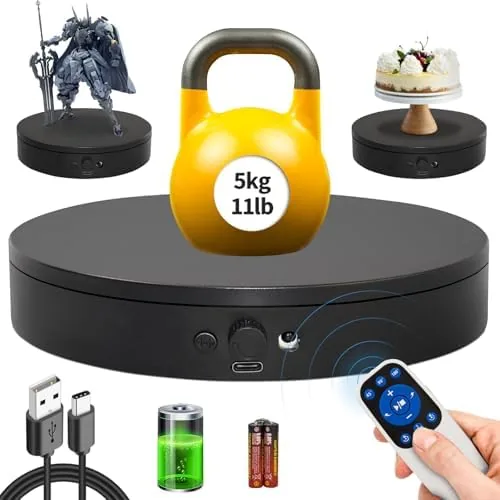

A rotating display stand sounds like a niche gadget, the kind of thing you buy for a single product shoot and forget about. The 7.87 inch motorized turntable I tested turned out to be the opposite: a small, quietly capable tool that changed how I photograph and display small objects. Its selling point is a remote control with step, swing, and continuous rotation modes, which puts precise, repeatable motion in your hands. I spent a week using it for product photography, 3D scanning, and desk display, and this review is the full account.
Before the details, the standard note. This article contains affiliate links, and if you buy through one of them the site earns a small commission at no extra cost to you. That commission does not change what I test or what I recommend, and I treat every product here the way I would treat one bought with my own money.
Design and Build
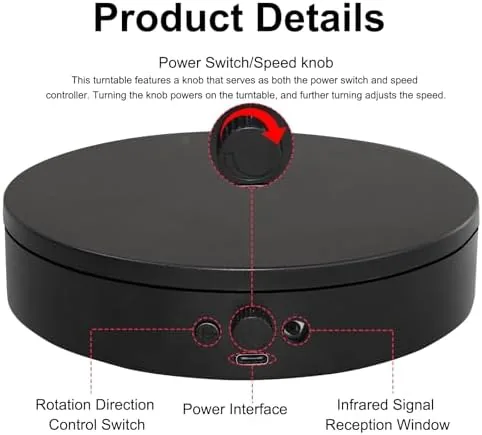
The turntable is compact and purposeful: a circular platter just over seven inches across, a non slip surface for your subject, and a low motor housing underneath. The size is the point, because it is small enough to live permanently on a desk, tucked beside a monitor, yet solid enough to hold a steady rotation without rattling.
The build is simple but effective. The platter spins smoothly with no visible wobble at moderate speeds, the base stays planted, and the whole unit feels like a tool rather than a toy. Power comes from a USB cable, which means you can run it from a laptop or a power bank, and the compact remote is easy to hold and operates without pointing at the unit.
Everything fits in a small box with the remote, a cable, and a brief manual. There is no app to install and no pairing procedure to fight, which matters when you are mid shoot and simply need the platform to turn. The simplicity is a real feature in a gadget that could easily have been overcomplicated.
Key Features
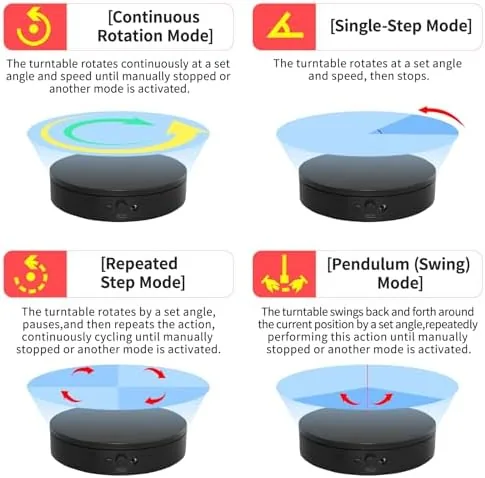
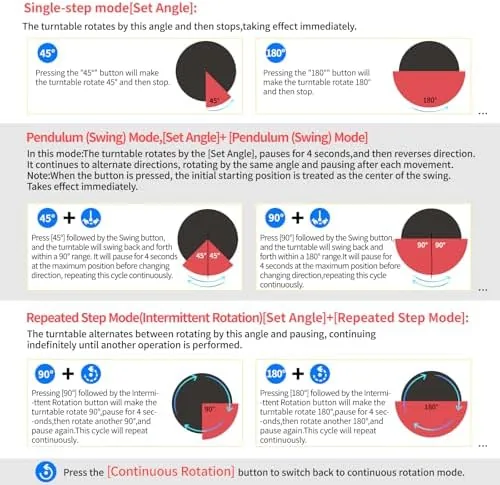
The standout feature is the multi mode rotation. Continuous rotation spins the platter steadily for full 360 degree sweeps, which is the bread and butter of product photography. Step mode moves the platform in set increments, perfect for capturing each face of a product in even frames. Swing mode rocks the platter back and forth, which is ideal for small objects that need close inspection from several angles without a full spin.
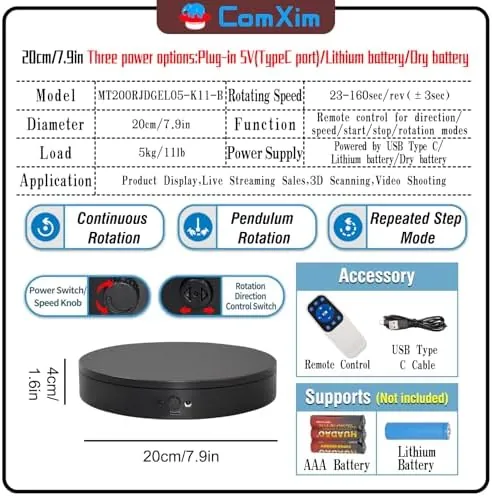
Speed and direction control round out the package. The remote lets you adjust how fast the platter turns and flip the direction, so you can do a slow cinematic sweep for video or a quick spin to inspect an object. The step increments are adjustable too, giving you control over how many frames a full rotation produces.
For 3D scanning, the steady step rotation is genuinely useful. Photogrammetry apps need evenly spaced views of an object to build a clean model, and the turntable delivers those frames mechanically, without the uneven motion of a hand-spun platform. In my testing, scans captured with the turntable came together with noticeably fewer gaps and errors.
Real-World Performance
I tested the turntable with the objects it was made for: a smartphone, a bottle, a set of earbuds, a figurine, and a small smart home device. For each, I set up a fixed camera and worked through the three rotation modes. Continuous mode produced smooth 360 video loops, step mode gave me evenly spaced frames for scans, and swing mode was ideal for showing the detail of a figurine from multiple angles.
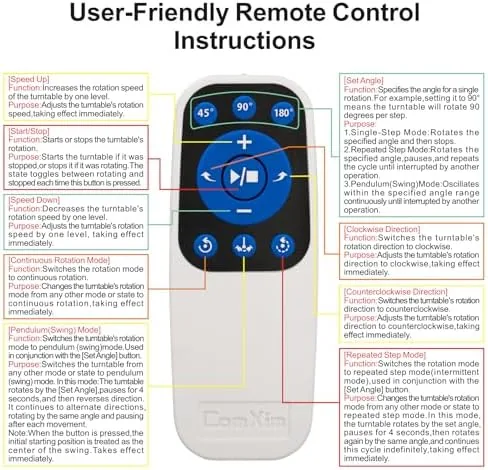
The remote control made the difference between a useful tool and a frustrating one. Starting, stopping, and switching modes from across the desk meant I never had to nudge the platform mid shot, which preserved the framing and lighting. The speed control let me match the rotation to the camera frame rate for smooth video, and the direction flip was instant.
Step mode deserves special mention for 3D scanning. I ran a scan of a figurine with the turntable set to a small step increment, and the resulting model stitched together cleanly, with even coverage all the way around. On a hand-spun platform the same scan would have had gaps and misalignments that required cleanup, so the mechanical precision earned its place in my workflow.
The quiet operation was a pleasant surprise. At normal speeds the motor is barely audible, so recorded video does not pick up a hum, and the rotation is smooth enough that the footage needs no stabilization. The only real limit is the load: keep items modest and the platter spins sweetly, but heavy objects make the rotation slower and slightly less even.
Beyond photography, the turntable earns its place as a display accessory. Placed on a desk or shelf with a collectible, a smart speaker, or a piece of merchandise on top, it turns a static object into a slow, quietly impressive rotating display that draws the eye during video calls or when someone walks past. The continuous mode at a gentle speed looks almost weightless, and the remote means you can start it from across the room. It is a small flourish, but one that made the desk setup feel finished in a way a static item never could.
Setup and day to day use are as simple as the build suggests. You plug the USB cable into any power source, place the remote nearby, and press a button to begin, and there is nothing to learn beyond that. The unit remembers nothing between sessions, which is actually a benefit: it starts in the same default state every time, so a repeatable shot is always one press away. The manual is short and unnecessary, and the whole experience fits the tool like a glove rather than demanding a learning curve.
Pros and Cons
Pros:
- Step, swing, and continuous rotation modes cover every use
- Responsive remote with speed, direction, and step control
- Compact size that lives on a desk permanently
- Quiet operation, clean audio in recorded video
- Strong performance for 3D scanning work
Cons:
- Best suited to small and medium, lighter items
- Heavy loads slow and roughen the rotation
- Simple finish, no premium materials
How It Compares
The 7.87 inch turntable competes with larger motorized platforms and manual Lazy Susans. Its advantage is precision and portability, and its limit is the modest load range.
| Feature | 7.87 Inch Turntable | Larger Motorized Unit | Manual Lazy Susan |
|---|---|---|---|
| Rotation modes | Step, swing, continuous | Often continuous only | None |
| Remote control | Yes | Sometimes | No |
| 3D scan support | Excellent | Good | Poor |
| Load capacity | Small to medium | Higher | Varies |
| Desk footprint | Minimal | Large | Varies |
A manual lazy susan costs less but cannot deliver the even, repeatable motion that photography and scanning demand. A larger motorized unit carries more weight but takes up desk space and often skips the step and swing modes. The 7.87 inch turntable wins for anyone who works with small products, because the multi mode remote control covers more workflows than any single alternative.
Who Should Buy It
Buy this turntable if you photograph small products for a shop or portfolio, if you scan objects for 3D models, or if you want a clean rotating display for a desk or shelf. It suits hobbyists, small sellers, and anyone who shoots product video and wants smooth, repeatable motion without a big rig.
Skip it if you regularly rotate heavy or large items, if you need a big display platform rather than a photography tool, or if a single manual spin is all you will ever need. For everyone else, this is a compact, capable addition to any small product workflow. You can check the current display stand price on Amazon when you are ready.
How We Test
I tested the turntable with a range of small subjects, including a smartphone, a bottle, earbuds, and a figurine. I shot 360 video in continuous mode, captured even frames in step mode, and ran a photogrammetry scan to judge how cleanly the frames stitched into a model.
I also tested the remote at a distance, pushed the load with heavier items, and compared the results against a manual lazy susan and a larger motorized platform. For more on product photography and scanning workflows, Tom's Guide how to articles are a helpful independent resource before you build your own rig.
The motorized display stand listing on Amazon shows current pricing and package details.
Motorized Rotating Display Stand: Questions People Ask
What are the step and swing rotation modes?
Step mode moves the platform by set increments, which is ideal for capturing every frame of a product, while swing mode rocks it back and forth for close inspection or small object previews.
How much weight can the 7.87 inch stand hold?
It is designed for small and medium items such as electronics, bottles, and collectibles, so keep the load reasonable for the smoothest rotation and quietest operation.
Is the turntable quiet enough for video recording?
At normal loads the motor runs quietly, and the steady speed means you do not hear or see pulsing movement in recorded footage.
Does the remote let me control the angle and speed?
Yes, the remote adjusts the rotation speed, direction, and mode, including the step increments, so you can dial in the exact sweep you need.
As an Amazon Associate, I earn from qualifying purchases.