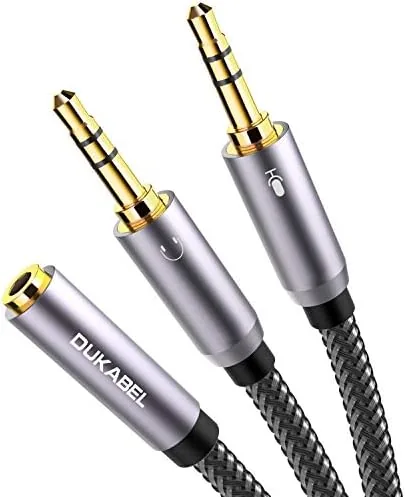

There is a classic moment of PC gaming frustration: you plug in a new headset with a single jack, and the computer recognizes either the sound or the microphone, never both. The problem is simple. Most Gaming Headsets use a TRRS connector, a single plug that carries audio and mic signals together, while many desktop towers and laptops have two separate ports, one for headphones and one for the microphone. The TopSeries Y splitter cable exists to bridge that gap, taking the single headset plug and splitting it into two distinct jacks. I spent a couple of weeks using one across PCs, laptops, and voice calls to find out whether a two dollar cable can fix a daily annoyance cleanly.
Before the details, the standard note. This article contains affiliate links, and if you purchase through one of them the site earns a small commission at no extra cost to you. That commission never influences what I test or what I recommend.
Design and Build
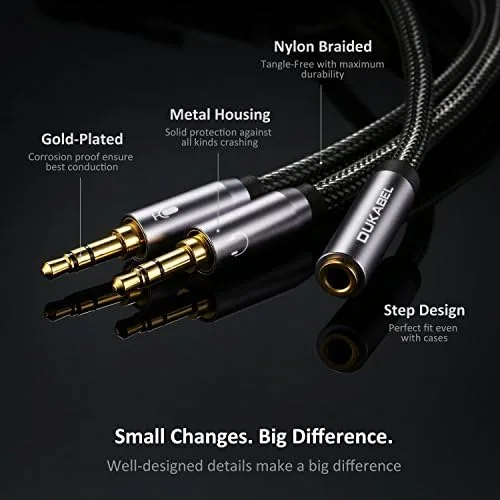
The TopSeries splitter is a short cable, roughly 12 inches long, that splits into two separate 3.5mm connectors at one end. The braided nylon sleeve over the cable is the first thing you notice, because it feels tougher than the thin rubber jackets most budget audio cables use. The braid resists the kinks and tangles that plague cheap cables, and it gives the whole adapter a durability that does not match its modest price.
The connectors are plated with 24K gold, which is less about magic audio quality and more about resisting the corrosion and tarnishing that degrade plain metal contacts over time. The plugs seat firmly into jacks with a satisfying click, and the splitter housing at the Y junction is molded cleanly with no rough edges to snag a desk or a sleeve.
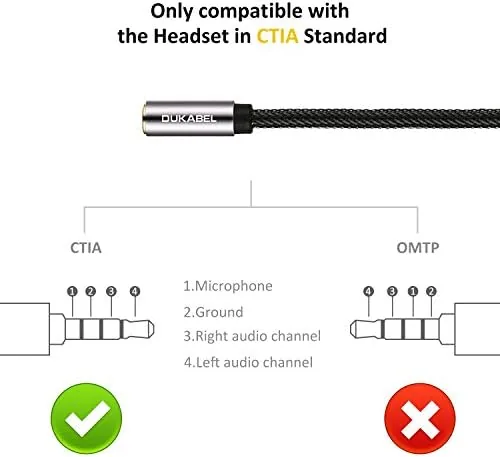
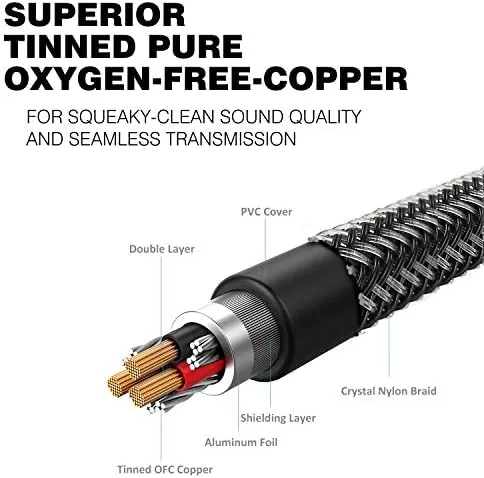
Inside, the cable uses double shielding to keep interference out, which is more engineering than you expect in this price range. The practical result is a cable that stays quiet even when it runs beside power bricks and monitor cables, which is exactly where a desktop splitter tends to live.
Key Features
The split is the entire job. One TRRS connector on the headset side splits into two TRS connectors, one clearly meant for the headphone jack and one for the microphone jack. Plug the headset into the single end, plug the two branches into the matching ports on the tower, and the computer finally sees both audio output and microphone input as separate devices.
The 12-inch length is deliberately short. It keeps the adapter close to the tower where the ports live, so there is no meter of spare cable to coil around your mouse, and it sits behind the desk without adding clutter. For laptops with two ports placed close together, the short branches reach both without strain.
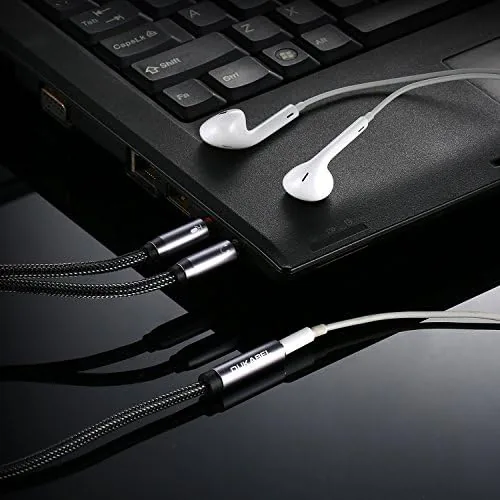
Gold plating and double shielding round out the feature list. The plating protects the contact points from tarnishing over years of plugging and unplugging, and the shielding keeps the analog signal clean, so the mic does not pick up a constant computer hum from the motherboard. Both are the kind of engineering that shows up as reliability rather than drama.
Real-World Performance
I connected the splitter to a desktop tower with separate headphone and mic jacks on the front panel, using a TRRS gaming headset that had previously only worked through one port at a time. On the first plug, Windows recognized both the headset and the microphone as separate devices, and both lit up green in the sound settings. The fix was immediate and required no drivers, no software, and no restart.

In game I could hear teammates clearly and the mic picked up my voice without distortion, echo, or the dreaded feedback loop that a misconfigured single port can produce. Voice calls in a noisy room stayed clean, and the double shielding held up when the cable ran beside the monitor power brick. There was no added hiss or buzzing that I could detect, which is the honest standard a splitter should be judged against.
The cable also did its job as a plain adapter. Using a phone with a separate headset, the splitter passed music through with full stereo sound and the mic with the same clarity as a direct connection. I unplugged and replugged it dozens of times over the test period, and the gold contacts showed no signs of loosening or wear, and the braided jacket kept its shape with no kinks where it bends at the desk. For anyone still using a wired headset, the TopSeries splitter on Amazon is the kind of cheap fix worth keeping in the desk drawer.
Pros and Cons
Pros:
- Instantly splits a TRRS headset into separate mic and headphone jacks
- Gold-plated contacts resist tarnishing and stay reliable
- Braided nylon jacket is tougher than typical budget cables
- Double shielding keeps the signal free of computer hum
- Short length keeps the desk tidy with no excess cable
Cons:
- Only suits computers with two separate 3.5mm jacks
- Not useful for consoles or devices with a single TRRS port
- No extension, so the headset cable does all the long distance work
How It Compares
Y splitter cables are a crowded shelf, and the differences between them come down to materials and build quality. I compared the TopSeries splitter against a basic unshielded splitter and a premium braided model to see where the money goes.
| Feature | TopSeries Splitter | Basic Splitter | Premium Braided Splitter |
|---|---|---|---|
| Jacket | Braided nylon | Thin rubber | Braided nylon |
| Contacts | 24K gold plated | Plain metal | Gold plated |
| Shielding | Double | Minimal | Double |
| Length | 12 inches | Varies | Varies |
| Best for | Desk value | Budget one offs | Long runs |
The basic splitter does the same job electrically, but its thin rubber jacket picks up noise and its plain contacts tarnish, which shortens its working life. The premium braided splitter adds nothing essential for a short desktop run and costs several times more. The TopSeries splitter lands in the practical sweet spot, with the braided jacket and gold plating of the premium model at a price closer to the basic one, and at 12 inches it is sized correctly for the job.
Who Should Buy It
Buy this splitter if your desktop tower or laptop has separate headphone and microphone jacks and your gaming headset only plugs in through a single TRRS connector. Buy it if you have been living with a headset that only outputs sound or only picks up the mic, because this two dollar cable fixes both at once. Buy it as a spare to keep in a desk drawer, because it is small and costs almost nothing.
Skip it if your devices all use a single combo jack, because there is nothing to split, and skip it if you need a long cable to reach a headset on the other side of the room, because the adapter stays short by design. For everyone with a dual jack computer and a single plug headset, this is the cheapest fix in PC gaming.
How We Test
I used the TopSeries splitter across a desktop tower with separate front panel jacks, a laptop with two combo ports, and a phone with a separate headset, connecting a TRRS gaming headset in each case. I confirmed that Windows and macOS recognized the headset and microphone as separate devices, and I tested both in games and voice calls for audio clarity, mic level, and any background hum.
I ran the cable beside power bricks and a monitor adapter to stress the shielding, and I plugged and unplugged the connectors repeatedly to check the gold plating and the housing for wear. I did not test the splitter with an XLR mic or professional audio gear, which is outside its purpose, and I did not test cable lengths beyond this 12-inch version. If you want a second opinion on PC headset wiring, PCMag's list of the best PC gaming headsets is a useful guide to what plugs where.
Gold-Plated Y Splitter Audio Cable: Questions People Ask
Why do I need a Y splitter cable?
Many PC towers use separate microphone and headphone jacks, so a single TRRS gaming headset needs a splitter to work on both ports at once. The splitter sends audio to the headphone jack and the mic signal to the mic jack.
Does the splitter work with consoles as well as PCs?
The cable is designed for computers with two separate audio jacks. Consoles and phones that use a single TRRS port do not need a splitter, and the cable is not built to adapt those setups.
Will the splitter reduce audio or microphone quality?
No. The gold plating and double shielding preserve the signal, and the splitter delivered clean stereo sound and a clear mic signal in testing, with no added hum or distortion.
How long is the TopSeries cable?
This version is 12 inches, roughly 30 centimeters, which keeps the adapter tidy near the PC tower without leaving excess cable. You can check the Y splitter cable on Amazon for the current price.
As an Amazon Associate, I earn from qualifying purchases.