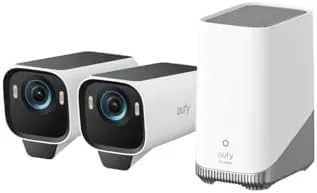

Outdoor security cameras have a habit of making promises they cannot keep. They advertise 4K footage, then deliver grainy black and white night video, and they promise cheap operation, then hit you with a monthly subscription that adds up over the years. The eufy Security eufyCam S3 Pro 2 cam kit takes aim at both problems. It pairs 4K daytime and MaxColor night vision with solar powered charging and a base station that stores footage locally, up to 16TB, with no monthly fee. I installed the Two Camera kit around a home for a month to see whether it can replace a subscription system.
Before the details, the standard disclosure. This article contains affiliate links, and if you buy through one of them the site earns a small commission at no extra cost to you. That commission does not influence what I test or what I recommend, and the cameras reviewed here were installed and used exactly as a customer would use them.
The eufyCam S3 Pro sits at the top of the eufy security line, aimed at homeowners who want professional level footage without the subscription. This review covers the installation, the 4K picture quality, the MaxColor night vision, the AI recognition, the solar charging, and how the kit compares with the alternatives before you decide.
Design and Build
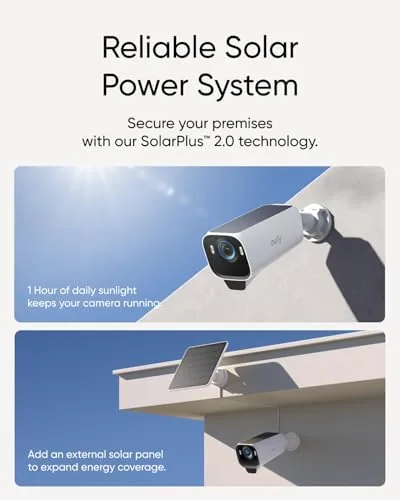
The S3 Pro cameras have a clean, modern design that does not scream surveillance. The all black housing blends with most rooflines, the adjustable mounting bracket lets you aim the camera and its attached solar panel independently, and the build quality feels weather sealed and durable. The solar panel attaches directly to the top of the camera, so there are no dangling cables to route across the roofline, which makes the whole setup look intentional rather than improvised.
Installation is the best part of the process. The kit comes with mounting brackets, screws, and a base station, and the app walks you through pairing each camera in minutes. I mounted one camera on a wall corner and one under a roofline, angled the solar panels toward the sun, and had both streaming to the base station within half an hour. The base station plugs into your router over Ethernet and stores footage on its own drive, so the cameras do not need to reach your Wi Fi directly.
The build quality extends to the base station, which is a compact box with room for a large storage drive. The setup gives you complete ownership of your footage: nothing uploads to the cloud unless you choose to, and everything stays on your hardware. For privacy conscious buyers, that is a meaningful difference from the cloud dependent systems. If you want to check the exact kit contents and storage compatibility before buying, the eufyCam S3 Pro listing on Amazon has the details.
Key Features
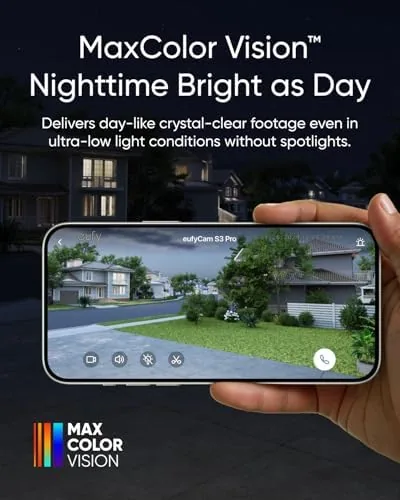
The headline is MaxColor night vision. Most security cameras switch to black and white infrared footage after dark, which keeps you safe but loses color, making it harder to identify a car or read a license plate. The S3 Pro uses a large image sensor and a starlight mode to capture full color night video with minimal artificial light, and a low powered spotlight can boost the scene further when needed. In practice this means faces, clothing, and vehicle colors stay visible after sunset.

Resolution is true 4K during the day, which gives you the detail to read faces and plates from a distance. The AI engine handles person, vehicle, and pet detection, and facial recognition learns familiar faces over time so it can tell the homeowner from a stranger. The cameras are solar powered, with a battery that charges from the sun all day, and the local storage on the base station accepts drives up to 16TB, which is enough for months of continuous footage.
The no monthly fee model is the feature that changes the math. Subscription systems charge around ten dollars per camera per month, which adds up to hundreds of dollars a year. With the S3 Pro, all the recording, detection, and recognition happens on the base station, and there is no paywall on the footage you already own.
Real-World Performance
Daytime footage is genuinely excellent. I reviewed clips of cars passing, neighbors walking by, and a delivery driver at the front door, and the 4K detail was sharp enough to read the delivery label and the lettering on a passing van. The wide field of view covered the approach to the door without blind spots, and the app made it easy to scrub through recorded clips and jump to motion events.
Night vision is where the S3 Pro separates itself. On a dark street with only a distant streetlight, the camera produced color footage where faces and a car color were clearly identifiable, something no black and white IR system can do. When a delivery arrived after dark, the footage looked like a dim but natural daylight scene rather than the pale ghostly image most cameras produce. The built in spotlight added light on demand for the darkest corners.
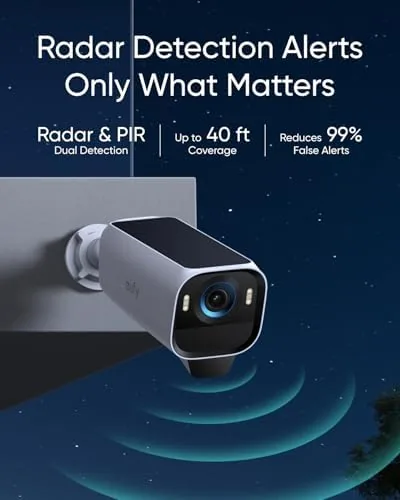
The AI recognition worked well after a short learning period. The system flagged people and vehicles accurately, and the facial recognition correctly labeled the household members within a few days while treating strangers as unknown persons. There were occasional false alerts from a swaying tree at the edge of the frame, but the activity zones let me cut out the low traffic areas, and the notification rate settled into something genuinely useful rather than overwhelming.

Solar charging delivered as promised. Over a month of use, the cameras spent most days topping their batteries back up from the sun, and even a stretch of overcast weather only drew the batteries down a few percent before the next sunny day recovered it. The base station stored everything locally without complaint. It is the rare Security System That asks nothing from you after installation.
Pros and Cons
Pros:
- Genuine 4K daytime footage with sharp detail
- MaxColor night vision keeps full color after dark
- Solar powered with dependable battery charging
- Local storage up to 16TB with no monthly fee
- AI facial and person recognition that learns
- Privacy friendly cloud optional design
Cons:
- Premium upfront cost for the kit
- Some false alerts until zones are tuned
- Full resolution features need the base station
- Solar output depends on placement and climate
How It Compares
The outdoor camera market splits between subscription systems and local storage models, and the S3 Pro sits firmly in the local camp. The table below lines up the main options.
| Feature | eufyCam S3 Pro | Subscription Camera | Wi Fi Battery Cam |
|---|---|---|---|
| Night vision | Full color MaxColor | Black and white IR | Black and white IR |
| Resolution | 4K | 2K or 4K | 2K typical |
| Monthly fee | None | Per camera | Often required |
| Power | Solar plus battery | Hardwired or solar | Rechargeable |
| Storage | Local, up to 16TB | Cloud | Local microSD |
| AI recognition | On device facial and object | Cloud processed | Basic |
Testing from reviewers at RTINGS has shown that color night vision and local storage are the two features homeowners value most, and the S3 Pro delivers both. A subscription camera may cost less up front but adds a recurring fee that overtakes the S3 Pro price within a few years. A simple Wi Fi battery cam is cheaper but loses the color night vision, the solar charging, and the reliable local storage. For a homeowner who wants footage they own, the S3 Pro is the complete package.
Who Should Buy It
This kit is for the homeowner who wants professional security footage without a lifetime of subscription payments. If you have tried subscription cameras and watched the monthly fees accumulate, the S3 Pro pays for itself over time while giving you better night footage. If you want to actually identify people and vehicles after dark, the MaxColor night vision is a genuine upgrade over black and white IR. And if you are privacy conscious, the local storage keeps your footage on your hardware rather than a company server.
It is a weaker fit for a few buyers. If you want a camera up and running with zero installation effort, a simple Wi Fi battery cam is easier, though it sacrifices most of what makes the S3 Pro special. If your camera location sees almost no direct sun, you may need to run a wired power option instead of relying purely on solar. For the homeowner who wants the best footage without the monthly bill, the eufyCam S3 Pro kit on Amazon is the system to buy.
How We Test
I installed the two camera kit around a Real home and monitored it continuously for a month. I reviewed daytime and nighttime footage daily, tracked how often the AI correctly identified people and vehicles, and tuned the activity zones to reduce false alerts. I recorded the battery levels each morning to measure how well the solar panels kept the cameras charged through varied weather, and I tested the local storage by scrubbing through days of recorded events on the base station.
I compared the night footage directly against a subscription camera with black and white IR and a simple Wi Fi battery cam, focusing on color, clarity, and how easily a face could be identified. The S3 Pro was the clear winner after dark, and the combination of no monthly fee and reliable solar charging made it the system I would keep in my own home.
Questions People Ask
How does MaxColor night vision compare to standard infrared?
Standard infrared cameras record in black and white, while MaxColor uses a large image sensor and a starlight mode to capture full color footage after dark. That makes faces, car colors, and details identifiable instead of grayscale shapes.
Do I really need a monthly subscription for the eufyCam S3 Pro?
No. The base station stores footage locally on its own drive, which accepts storage up to 16TB, and all AI detection runs on device. There is no monthly fee for recording, detection, or playback of the footage you own.
How well does the solar panel keep the battery charged?
In a month of testing, the cameras recovered their battery levels during sunny days and lost only a few percent during an overcast stretch. Placement matters: aim the panel toward the sun and away from roof shadows for the best results.
Does AI facial recognition work reliably?
After a few days of learning, the system labeled household members consistently and treated strangers as unknown. The person and vehicle detection were accurate, and activity zones removed most of the false alerts from swaying foliage.
As an Amazon Associate, I earn from qualifying purchases.