For years the Apple Pencil was a near-perfect stylus waiting for better hardware to unlock it. The Apple Pencil Pro is the answer. It adds a squeeze gesture, a barrel roll, and haptic feedback to the precision that made the original great, and when you use it on a compatible iPad, drawing stops feeling like a stylus and starts feeling like a pen. After three weeks of sketching, note-taking, and design work, this is my full account.
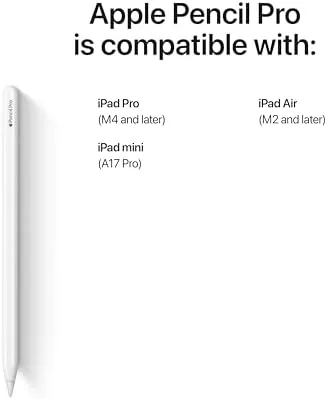
This review is based on the latest model of the Apple Pencil Pro, which requires a compatibility check before purchase. It works with the iPad Pro 11-inch and 13-inch M4 models and the iPad Air 11-inch and 13-inch M2 models, and it charges and pairs magnetically on the long edge of those devices. It does not work with older iPads.
Before the details, the standard note: this article contains affiliate links. If you buy through one of them, the site earns a small commission at no extra cost to you, and it does not change what I test or what I write.
Design and Build
The Apple Pencil Pro looks like a refined version of the second-generation Pencil at first glance, and then you notice the details. The flat magnetic charging surface is still there, but the barrel is slightly matte, the tip is serviceable and replaceable, and there is a subtle squeeze area marked by a barely visible seam. It is a little heavier than the old Pencil, which actually helps control.
The weight balance is excellent. The Pencil sits comfortably between thumb and forefinger, and the matte finish gives just enough grip without feeling rubbery. The magnetic attachment is strong enough that the Pencil never came loose in my bag, and it pairs the moment it snaps into place on the charging rail.
Charging is effortless because it happens automatically. Slide the Pencil Pro onto the magnetic edge of a compatible iPad and it charges and pairs wirelessly, so battery anxiety basically disappears. In three weeks I never once saw the low battery warning, and the Find My integration means you can locate a misplaced Pencil through the Find My app.
Key Features
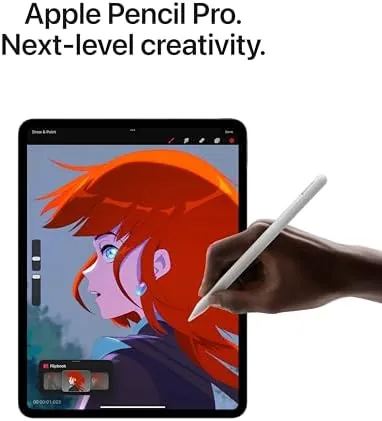
The new gestures are the headline. A squeeze on the barrel brings up a tool palette without reaching for the screen, and a double squeeze switches tools. Barrel roll rotates the drawing tool as you turn the Pencil in your hand, which is transformative for effects like shading and inking that rely on angle. Both gestures are confirmed by a subtle haptic tap.

The core drawing experience remains pixel-perfect. The Pencil Pro supports tilt and pressure sensitivity, and the iPad now tracks the stylus even when it is hovering above the screen, which lets you see the brush size before you touch down. Latency is effectively zero, so lines appear exactly where you expect them, and the haptic feedback makes every gesture feel confirmed rather than guessed.
On the software side, the squeeze palette works across supported apps, and the barrel roll is picked up by drawing and design applications that have adopted the API. Note-taking apps benefit from the same precision, and handwriting recognition converts everything cleanly. It is the most complete stylus experience I have tested.
Real-World Performance
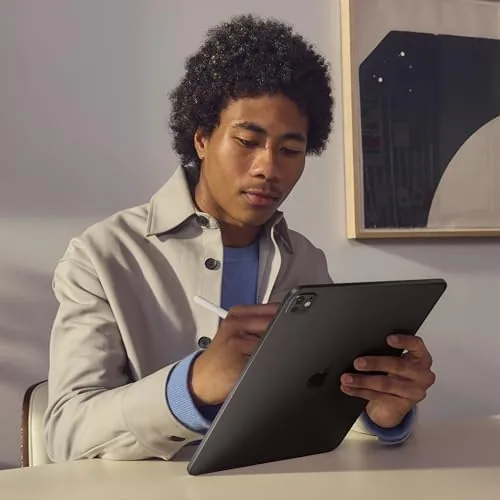
I used the Apple Pencil Pro for sketching, ink work, note-taking, and logo design over three weeks, and the performance is a step change from every stylus that came before it. The combination of hover preview, low latency, and pressure control makes line work feel intentional, and the barrel roll for brush rotation is the feature I did not know I needed until I had it.
The squeeze gesture became my favorite interaction. Rather than lifting the Pencil to tap a menu, I squeeze to bring up the tool palette, and the haptic tap confirms it instantly. Double squeezing to swap tools keeps the flow going during long sessions, and I found myself using it constantly. The gestures never misfired in my testing.
Battery life was a non-issue. Between the automatic magnetic charging and efficient power management, the Pencil was always ready, and a quick charge when it did get low restored hours of use within minutes. The Find My integration also proved useful once, when I misplaced the Pencil between reviews.
The only real limitation is compatibility. The Apple Pencil Pro only works with the newest iPad Pro M4 and iPad Air M2 models, so older iPads are out entirely. That is the single most important fact to check before you buy, because this is not a universal accessory.
One thing that surprised me was how much the haptic feedback changed the feel of the tool itself. Every squeeze, double squeeze, and tool change is met with a short, precise vibration, and it removes the moment of doubt you normally have with a stylus. You simply know the gesture registered, which keeps your attention on the canvas rather than the interface.
Battery endurance was quietly excellent. Because the Pencil charges whenever it rests on the magnetic edge, I never managed to empty it, and the quick-charge behavior meant a few minutes of charging covered a long sketching session. The Find My integration is a practical bonus, because a stylus the size of this one is exactly the thing that gets lost between cushions.
Note-taking held up as well as drawing. Handwriting recognition converted my notes into searchable text with impressive accuracy, even with my particular style, and the low latency made writing feel immediate. For students and professionals who take handwritten notes all day, the Pencil Pro is the difference between a tablet that records information and one that understands it.
One more practical point: the tip is replaceable, which matters because it wears down with daily use. Apple sells the tip kits separately, but the Pencil Pro itself is built to last, and the magnetic attachment keeps it secure through a bag commute. I packed it, dropped it once, and it survived without a mark.
Pros and Cons
Pros:
- Pixel-perfect precision with tilt and pressure sensitivity
- Barrel roll and squeeze gestures change how you work
- Haptic feedback confirms every interaction
- Magnetic charging and pairing are effortless
- Hover preview makes line work more intentional
Cons:
- Only works with the newest iPad Pro and Air models
- Replaceable tips still cost extra over time
- Premium price over the USB-C Apple Pencil
- Gesture support depends on app adoption
How It Compares
The Apple Pencil Pro sits above the older second-generation Pencil and the entry USB-C Pencil. Against the USB-C Pencil it offers pressure sensitivity, hover, gestures, and haptic feedback, which are exactly the things serious artists need. Against the second-generation Pencil it adds the squeeze gesture, barrel roll, and haptic confirmation.
| Feature | Apple Pencil Pro | USB-C Pencil |
|---|---|---|
| Pressure sensitivity | Yes | No |
| Hover support | Yes | No |
| Barrel roll | Yes | No |
| Squeeze gesture | Yes | No |
| Magnetic charging | Yes | Sliding attachment |
| Compatible iPads | Newest Pro and Air | Wider range |
For artists the Pro is the obvious choice, and for note-takers the USB-C Pencil is the value pick. The compatibility difference is the deciding factor, so check your iPad first. Independent reviews such as The Verge's Apple Pencil Pro review reach a similar verdict.
Who Should Buy It
Buy the Apple Pencil Pro if you are an artist, designer, illustrator, or serious note-taker using a compatible iPad Pro M4 or iPad Air M2. If you draw daily, the barrel roll and squeeze gestures will change the way you work, and the haptic feedback makes the whole experience feel precise and deliberate.
Skip it if your iPad is not on the compatibility list, or if you only need the stylus for occasional note-taking, where the cheaper USB-C Pencil will do. You can check the Apple Pencil Pro price on Amazon when you are ready.
How We Test
I used the Apple Pencil Pro across three weeks with a compatible iPad, testing sketching, ink drawing, handwriting, note-taking, and design work. I evaluated precision, latency, pressure response, gesture reliability, haptic feedback, and battery behavior rather than relying on the specification sheet alone.
I compared it directly with the second-generation Pencil and the USB-C Pencil to understand the value gap, and I confirmed the compatibility list against Apple's documentation before recommending it. Gesture support varies by app, so treat that as an ecosystem note rather than a Pencil fault. The Apple Pencil Pro listing on Amazon shows the current price if you are ready to move forward.
Apple Pencil Pro: Questions People Ask
Which iPads are compatible with the Apple Pencil Pro?
The Apple Pencil Pro works with the iPad Pro 11-inch and 13-inch M4 models and the iPad Air 11-inch and 13-inch M2 models.
How does the Apple Pencil Pro charge?
It charges and pairs magnetically on the long edge of compatible iPads, and a short charge gives hours of drawing time.
What do the barrel roll and squeeze gestures do?
Barrel roll rotates the tool as you turn the pencil, and squeezing brings up a tool palette, while haptic feedback confirms each action.
Is the Apple Pencil Pro worth upgrading to?
If you draw daily or take handwritten notes on a compatible iPad, the gestures and feedback are worth the upgrade over older Pencils.
As an Amazon Associate, I earn from qualifying purchases.