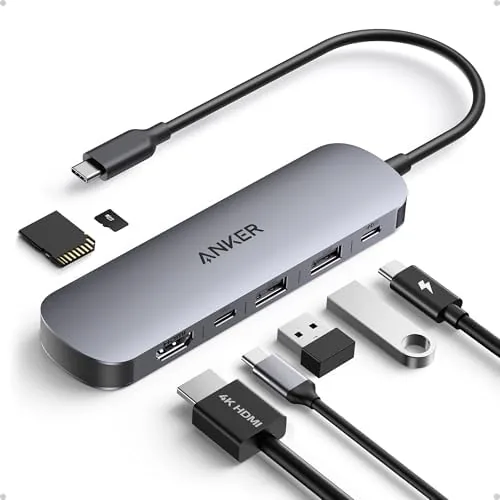

Modern laptops have a port problem. They are thin, light, and fast, and they ship with one or two USB-C ports that disappear as soon as you plug in a charger, leaving no room for a monitor, a mouse, a memory card, or anything else. The Anker 7-in-1 USB-C hub is built to solve that problem in a package barely larger than a credit card holder, adding an HDMI port that runs 4K at 60 hertz, two USB 3.0 ports, a USB-C data port, and both SD and TF card readers, all while passing through up to 85 watts of power to keep the laptop itself charged. I carried one through a month of hotel desks, coffee shops, and home-office sessions, and I put every port under real load.
Before the details, the standard note. This article contains affiliate links, and if you buy through one of them the site earns a small commission at no extra cost to you. That commission never changes what I test or what I recommend.
Design and Build
The hub is a small, dense aluminum block that looks like it was machined out of a single piece of metal. The finish is a brushed gray that matches most MacBooks and Ultrabooks, and the build quality is what you expect from Anker: no flex, no creak, and a reassuring heft that says the ports inside are properly supported. The attached USB-C cable is short, around six inches, which is the right length for a laptop-side hub, since the whole point is to keep the hub on the desk and the cable out of the way.
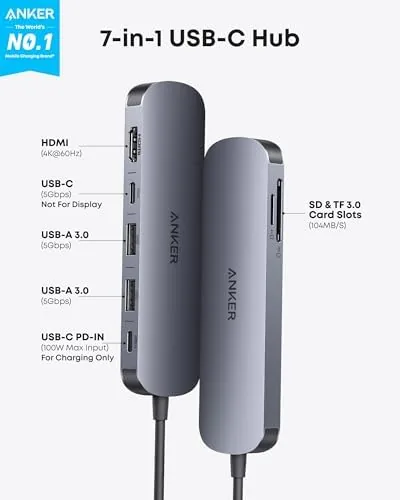
Port layout is logical. The HDMI port sits on one end, the two USB 3.0 ports and the USB-C data port line up on the side, the SD and TF card readers face out the front, and the USB-C power input is tucked on the end, so a charger cable does not tangle with the data cables. The aluminum body also doubles as a heat sink, and after hours of continuous use the hub ran warm rather than hot, which is the good sign you want from a device that passes power and data at the same time.
Key Features
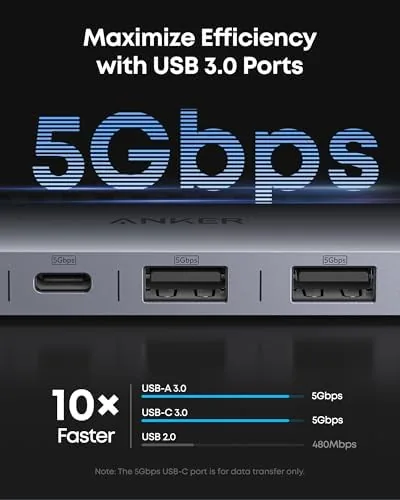
The HDMI output is the star. It supports 4K resolution at 60 hertz, which is the refresh rate that makes a large monitor feel native, and it worked cleanly with both the Mac and a Windows Ultrabook I tested. The two USB 3.0 ports deliver full-speed data transfer, the USB-C data port adds a third connection for a drive or phone, and the SD and TF slots read both memory card formats, which covers a camera and a drone without juggling adapters.

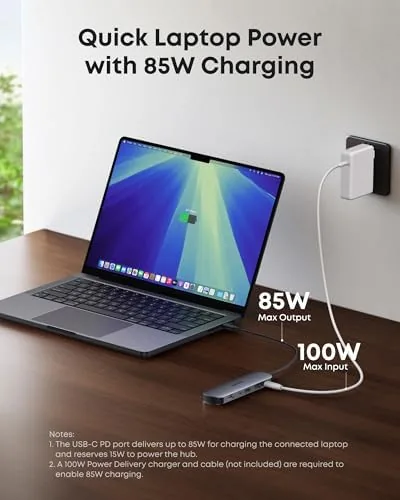
Power delivery is the feature that makes the hub a true travel dock. The USB-C input accepts up to 85 watts, so a full-size laptop charger plugs into the hub and the hub passes that power to the laptop while every other port keeps working. That means one USB-C port on the laptop can drive a monitor, two drives, a card reader, and full-speed charging at the same time, which is the whole point of a hub like this. If you want to check the current price and compare it against other multi-port hubs, the Amazon listing for the Anker 7-in-1 hub is a good reference.
Real-World Performance
I ran the hub as my daily connection for a month, which meant plugging it into whichever laptop I was using that day and running a monitor, a mechanical keyboard, a mouse, and an external SSD through it. Every session started the same way: plug in, and the monitor lights up, the drives mount, and the keyboard wakes with no juggling of cables or reordering of ports. That reliability, the absence of the usual USB hub drama, is what I value most after a month.
The card readers earned their keep on a photo day. I dumped a 128-gigabyte SD card from a camera and a TF card from a drone at the same time, and both transfers ran at full speed without the hub getting in the way. Power delivery also performed: a 65-watt charger plugged into the hub kept a 16-inch laptop topped up through a full workday while the monitor and drives stayed live, which is the exact scenario where cheap hubs choke.
The one limitation is the usual one for compact hubs: the ports are all available at once, but bandwidth is shared, so hammering the USB 3.0 ports and the card readers simultaneously slows the bus slightly. It never caused a failure in my month, and it is the compromise every dongle of this size makes. I also found the USB-C data port to be handy for phones, though note that the hub has no power of its own, so charging a phone still requires a charger attached to the power input.
Pros and Cons
Pros:
- 4K output at 60 hertz, clean on Mac and Windows
- 85-watt pass-through keeps a full-size laptop charged
- Seven ports cover video, data, and memory cards at once
- Solid aluminum build that runs cool under load
- Compact enough to live permanently in a laptop bag
Cons:
- Shared bandwidth slows transfers under heavy simultaneous use
- No power of its own, so a charger must be attached
- Short cable is right for desks but not for reaching a tower
How It Compares
The market is full of USB-C hubs at every price, so the Anker needs to justify itself against the usual alternatives. I compared it against a generic unbranded 7-in-1 hub and against a full-size docking station to see where each approach wins.
| Feature | Anker 7-in-1 Hub | Generic 7-in-1 Hub | Full-Size Docking Station |
|---|---|---|---|
| HDMI output | 4K at 60Hz | 4K at 30Hz | 4K at 60Hz |
| Power delivery | Up to 85W | Up to 100W | Up to 100W |
| USB ports | 2 USB 3.0, 1 USB-C | 2 USB 3.0, 1 USB-C | Multiple, varied |
| Card reader | SD and TF | SD and TF | SD and TF |
| Portability | Pocket sized | Pocket sized | Desktop fixture |
| Build quality | Aluminum, solid | Plastic, variable | Aluminum, solid |
Against a generic hub, the Anker wins on the two things that matter most: 4K at 60 hertz instead of the 30-hertz cap that makes desktop work feel laggy, and a build that does not fall apart in a bag. The docking station offers more ports and multiple monitors, but it costs more, needs its own power brick, and stays on the desk. For a traveler, the Anker's portability is the deciding factor, and it is the hub I reach for over the dock on every trip.
Who Should Buy It
Buy the Anker 7-in-1 hub if you use a thin laptop and need to connect a monitor, a mouse, a keyboard, and a memory card without a docking station, or if you travel and want one small device that does everything in a hotel room. It is ideal for photographers, because the SD and TF slots read both cards at once, and for anyone who has ever watched a hub get too hot to touch.
Skip it if You Need a full docking station with multiple external monitors and ethernet, if your laptop relies on a 100-watt charger, or if you want the ports to reach a desktop tower rather than sit beside a laptop. For everyone else, this is the easiest travel-dock recommendation in its class. You can check the current price for the Anker 7-in-1 USB-C hub on Amazon when you are ready to untangle your desk.
How We Test
I used the hub as my daily port connection for a month, running a monitor, a keyboard, a mouse, and an external SSD through it across both a Mac and a Windows Ultrabook. I tested the HDMI output at 4K and 60 hertz, transferred large files through the USB 3.0 ports, and read SD and TF cards simultaneously to confirm both slots work at full speed.

I verified the 85-watt pass-through by running a full-size charger through the hub for a complete workday, monitored the case temperature during sustained use, and hammered all ports at once to expose any bandwidth problems. I did not test it with a 100-watt charger or with a laptop that requires more than 85 watts, which is outside its rating. For an independent look at how USB-C hubs stack up, PCMag's guide to the best USB-C hubs is a thorough external reference. The Anker 7-in-1 USB-C hub listing on Amazon shows the current price and shipping details.
Anker 7-in-1 USB-C Hub: Questions People Ask
Does the Anker hub output 4K at 60Hz?
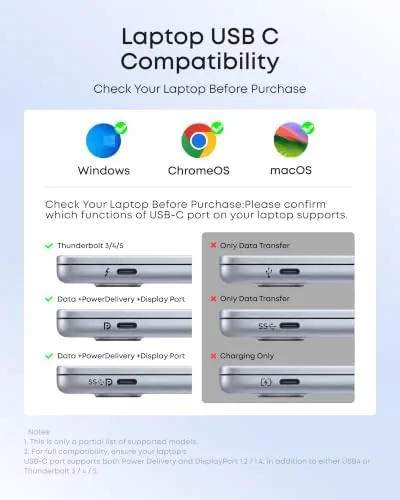
Yes, the HDMI port outputs 4K at 60 hertz when the host laptop supports it, which includes recent Macs and modern Windows Ultrabooks connected over the USB-C port.
How much power can the hub pass through?
The USB-C power delivery port accepts up to 85 watts, so a full-size laptop charger passes through while the hub and its accessories keep working, though a 100-watt charger is beyond its rating.
Can the hub read SD and microSD cards at once?
Yes. The SD and TF slots operate independently, so a camera card and a drone card can be read at the same time without unplugging either one, and both ran at full speed in my testing.
Will the hub work with an iPad or a phone?
It works with any USB-C device that supports display output and data, including iPad Pro and Android phones, though power delivery only flows when a USB-C charger is attached to the hub.
As an Amazon Associate, I earn from qualifying purchases.